InFocus has went ahead and launched the Bingo 10 smartphone in India. The pricing of which is kept at Rs. 4,299. The smartphone will go on sale this monday on Snapdeal.
The one thing that we at beetel bite find really interesting was that this is the “world’s most affordable Android Marshmallow smartphone.” yes you read right Bingo 10 comes with Android 6.0 Marshmallow out-of-the-box, though what we found a thing that was not so interesting and that is that it comes with the skin InLife UI 2.0.
The InFocus Bingo 10 sports a 4.5 inch FWVGA display and it is powered by a 1.3GHz Quad-Core MediaTek processor rocking 1GB of RAM and 8GB of internal storage, and as a plus point it has expandable storage which can be expanded upto 64GB. The phone is a dual sim supporting phone and has a 2,000mAh battery to power itself. The rear camera is 5MP with LED Flash and the Front is 0.3MP(VGA).
The measures of the device are as follows -
135.6×67.3×10.4mm
The device will come in 2 colours Black with Blue Band and White with Green Band.
The phone only disappointed us in one area and that is that it only is supporting 3G and not 4G in this day and age.
Commenting on the launch, Sachin Thapar, Country Head, InFocus India said, “With InFocus Bingo 10, we want everyone to be able to get the taste of Marshmallow, which is still seen as a preserve of high-end smartphones. InFocus Bingo 10 is our endeavour to cater to the core needs of age group of 15-24 years and it perfectly complements their style quotient with attractive colour frames and superior design quality.”
InFocus has so far launched the Bingo 21 priced at Rs. 5,499; the InFocus Bingo 20 priced at 5,749, and InFocus Bingo 50 with a price tag of Rs. 7,499.
Mumbai, India, March 23, 2016: Skin4Gadgets, an Ecommerce dealing with Laptop skins, Mobile skins, Mobile cases and covers, MacBook Sleeves and many other customized items has shook hands with Universal Music India, a no. 1 music and media company, so that their customers could get full access to Universal Music’s copyrighted merchandise. The company is providing assorted range of Universal Music products like Mugs, Canvas, Hard shell, Sleeves, and Phone cases.
With Skin4Gadgets, you can get an opportunity to legally use the copyrighted products of your favorite artist like Bob Marley, Justin Bieber, Eminem, Katy Perry, Lady Gaga, Ariana Grande, PSY and bands like Green Day, Avenged Sevenfold, Queen, Rolling Stones, Guns N Roses, Black Sabbath, Bullet For My Valentine. You can browse through a wide range of Universal Mugs, Canvas, Hard shell, Sleeves, Phone Cases. Find these products at Skin4Gadgets.com > Celebrity Store > Artist/Bands/Shop By Products.
Universal Phone Cases: Universal phone cases are best in class cases or covers for your mobile phones. These cases carry licensed images of your favorite Universal Celebrity Artists or Bands, yet maintaining the original look and feel of the device. The case is strong enough and protects your phone in order to prevent your device from scratches and bumps and is strong enough to withstand small drops.
Universal Hard Shell: These Universal cases are easy to snap on and snap off with precise fitting and are easy accessing for button as well as port access. It is designed in a way that it does not block radio antenna. It is Ultra-thin, Ultra-light and protects your phone from dirt, scratches and accidental damages. It comes with spectacular and vivacious graphics made up of high quality rubberized cases with image of your favorite artist printed in a way that it lasts long and doesn't fade away.
Universal MacBook Sleeve: These MacBook Sleeves along with protecting your device, also makes your MacBook look stylish with official licensed image that would make your Laptop stand out. These notebook sleeves complements your computer These Notebook Sleeve complements your Computer and works as the best accessory to move around your Laptop/ Notebook in your house/ office/ workplace/ meetings/ college, school campuses without the need to move around with the bulky bag. This multi-purpose sleeve is Waterproof and dust resistant, it is perfect for daily use. They all are assured with good quality and aesthetic appeal.
Universal Mugs: Universal Mugs are made up of 100% A5 food grade Melamine. They are resistant to high heat and shatterproof. These mugs also don’t absorb fluids from food easily.
Universal canvas:Skin4gadgets provide best Wall art printed on high grade archival canvas which would suit perfectly to the walls of your office, home, hotels or restaurants. The sides are printed in in matching colours. They are hand stretched, Quality Certificate passed Canvas in order to ensure high standards. You will adore the way it adores your wall.
About Skin4Gadgets: Skin4Gadgets provides for an array of graphics and legendary brush-strokes to choose from. The unending options also include the alternative of uploading your favorite photograph and rounding it off with an edge and sparkle! We make sure your device accessory stands out making a mark. We use the best quality product for the skin ensuring optimum safety for your gear.
LG just announced that its flagship the LG G5 will be going on sale in South Korea starting March 31. The company also confirmed that the LG G5 will be available to buy in the US starting April 1.
The company has not revealed the launching price that it will sell the device for but however, a Reddit user has shared an image of a promotional banner showing the G5 pricing of $99.99 on Sprint and Verizon mobile carriers for a 2-year in the US. The unactivated or unlocked price is mentioned as $799.99 (roughly Rs. 53,000). Additionally, LG is also running a pre-order campaign for the G5 where consumers will get a free second battery and charging cradle, and there is news that AT&T will give a buy one get one free offer.
The critics have been praising the phone like it is the greatest innovation of the year and yes being the first modular phone in the market the critics are not wrong.
LG also stated that they would be launching the G5 in India in the next quarter.
According to an online retailer in the UK, the LG G5 will be available at GBP 449.17 (roughly Rs. 42,700) excluding VAT, and GBP 539 (roughly Rs. 51,270) inclusive of VAT.
The biggest feature that the people are talking about in the LG G5 are the LG Friends which are the add-on modules of the phone. LG Cam Plus is a camera module that adds physical buttons for camera operations along with expanding the total battery capacity to 4000mAh. The Hi-Fi Plus module, co-developed by Bang & Olufsen, is a portable Hi-Fi DAC which can be used as a standalone portable DAC or with the G5 to enable 32-bit audio playback. LG is most probably going to showcase the companion devices in india with the launch of the G5 in India which include - LG 360 VR, LG 360 CAM, LG Rolling Bot, LG Tone Platinum, H3 by B&O Play, LG Smart Controller, and LG Friends Manager.
LG is trying to expand the range of modules that are being offered by calling developer conferences worldwide and plans to introduce SDK (Software Development Kit) and HDK (Hardware Development Kit) through developer.lge.com website in April for developers to come up with new modules.
The latest software for Android Wear is now available for ASUS ZenWatch 2 (WI501Q & WI502Q). This latest software release offers improvements and new features, including:
Speaker support
With support for the built-in speaker in ZenWatch 2 (WI501Q), you can now make phone calls when connected to your smartphone via Bluetooth, set audible alarms, and hear app notification alerts and sound effects.
Instantly turns into ambient mode for extra privacy and reduce battery drain by an intuitive gesture. To activate, simply lower your wrist to remove from the usual viewing orientation after interacting with your ZenWatch 2.
Audio messages
Play video and audio messages with apps like Glide or other apps that support these functions.
To update ASUS ZenWatch 2
When an update to your Android Wear software is available, you'll get an automatic notification on your watch when your watch is connected to the charger, is within Bluetooth range of your phone, and your phone is on and connected to the Internet.
To manually update ASUS ZenWatch 2
If you didn't get a notification that a software update is available but want to check to see if one is available, do the following
Pair ASUS ZenWatch 2 with a phone running Android 4.3 or iOS 8.2 or higher
On ASUS ZenWatch 2, swipe left on the watch face
Tap Settings > About > System updates
Follow the onscreen instructions to perform the update.
Keep your watch connected to the charger and paired with your phone until the update is complete.
For Further Assistance
If you need additional help, please contact your local ASUS service center, or visit www.asus.com.
Best Free Backup Software: AOMEI Backupper Standard
Looking for a good backup tool to back up your entire partition or disk? Here is one for you. AOMEI Backupper Standard is the best free backup software that could back up not only data but the system to ensure your computer safety with a simple and intuitive user interface. It’s a perfect solution for Windows users; both 32-bit and 64-bit editions are supported.
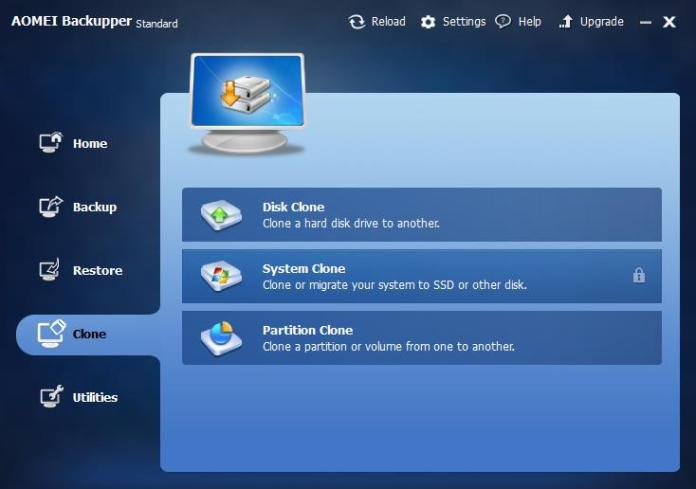
The main interface has 4 tabs on the side, with each tab representing a single function of the program. They are: Backup, Restore, Clone and Utilities.
Backup tab offers 5 types of back up options.
System Backup: Easy system drive backup of all contents, including Windows operating system and system settings without interrupting the system.
Disk Backup: Backup your hard disk drives, including internal disk, external disk, USB flash drive and other storage devices that can be recognized by Windows.
Partition Backup: This free back up software allows you to back up selected partitions or volumes to a compressed image file.
File Backup: Securely backup individual files and folders, such as office files, photos, videos, documents, games and programs. Also support backing up files on network or NAS.
File Sync: Synchronize files and folders automatically with a schedule to local disks, external hard drives, removable USB flash drives, NAS or network shared folders.
You can set up a schedule to automatically backup your system and data. It’s extremely useful and handy for those who want to their backups done at a lesser frequency or in a multiple backup sets.
Restore function offers 3 types of restore options: System Restore, File Restore and Disk/Partition Restore.
It is worth mention that Aomei has become the first software company to provide Dissimilar Hardware Restore feature for FREE! No other free imaging program includes this feature. The process is quite simple: create an image of a good working operating system on the old hardware and then restore that image to the new hardware using Aomei Backupper’s “Enable Universal Restore” option, which automatically detects any differences in hardware between the source computer and target computer.
Clone tab offers 3 types of backup options.
Disk clone: Directly copy a hard drive to another without creating an image file. It supports to copy large hard disk drive to small solid state drive (HDD to SSD).
System Clone: Clone operating system (OS) and all applications in system drive to the faster SSD or a larger hard disk drive without re-installing Windows. Much efficient when you want migrate os to ssd.
Disk Clone: Directly copy a hard drive to another without creating an image file.
Utilities tab includes 6 handy utilities that can be very useful.
Check image file to make sure the integrity of the image files consistent.
Create bootable media as a rescue tool to restore system drive in the event that Windows can no longer boot.
Explorer image to let you browse through the image file to see what files and data are being backed up and included in the back up image file.
Export all back up tasks stored in a file which can be imported later.
View logs function shows you the log information of what operations this program has done.
PXE Boot Tool: Start up client PCs within LAN through the network booting by using AOMEI Windows PE and Linux micro-system or your own personalized bootable image file on a master PC for system maintenance.
Overall, AOMEI Backupper is a nice back up utility with amazing features which will satiate your desire for the best free back up software. It’s simplicity and easy to follow user interface especially recognized by world around users. It’s absolutely worth a try.
Panasonic Introduces Smooth Data Sailing with the SAIL UI enabled T50 smartphone
· 4.5 inch device with Android™ Lollipop with Panasonic SAIL UI available at a best buy of Rs. 4,990
· 1.3 GHz Quad core processor with 1GB RAM plus 8 GB Internal memory, expandable up to 32GB· 5 MP Rear camera with LED flash and 2 MP front camera
9th March, 2016: Building on its existing repertoire of T-Series smartphones, Panasonic India today launched the T50 model enabled with the company’s exclusive in-house SAIL user interface. With data patterns in India reaching peak numbers, the T50 is an intuitive device which prioritizes ease of use during app usage and data consumption. Engineered to optimize user experience, the newly introduced SAIL UI enables users to seamlessly switch between multiple apps, organize apps by genre, and control onscreen operations with gestures.
The Smoothest Android User Interface Yet Established on Android 5.1 (Lollipop) OS, Panasonic’s SAIL UI is a fluid platform with customized features for the T50 while delivering the original Android experience. Advanced launcher settings like Batch Arranging which helps consolidate multiple apps into batches like genre and frequency of use, allows the user to create personalized headers for app management. Complimentarily, the File Manager offers an enhanced visual layout and improved folder management for easy access. Gesture Control allows the user to access multiple features and operations directly, such as screen shot by a simple finger swipe.
Introducing the SAIL Camera and Visual Effects in a Smartphone
From the 4.5” HD IPS display which renders wider viewing angles, to the contour edge design for a comfortable palm fit and premium look, the T50 is an aesthetic model which not only looks beautiful, but takes stunning photos. The SAIL interface is even integrated into a 5 MP rear camera optimized by LED flash and a 2 MP front facing lens. With 9 beauty camera modes, the SAIL camera offers a plethora of photography options for different scenarios, including Pose mode, Child mode, and Watermark. The device is pre-set withTheme Club which offers complimentary free themes for a refreshed new look every time it’s used, and Special Effects ranging from innovative magic finger to attractive screen transition animations. Available in the hues of rose gold, champagne gold, and midnightblue, the T50 is suited to any taste. With hardware selectively integrated to meet data processing and simultaneous functionality, the T50 is powered by an Android 5.1 (Lollipop) OS and a 1.3 GHz Quad Core processor. It comes loaded with 1GB RAM plus 8GB internal memory, expandable up to 32GB with the use of a micro and equipped with 3G connectivity, the dual SIM model runs on a 1600mAH battery. The phone is available at a best buy of Rs. 4,990.
Commenting on the launch, Mr. Pankaj Rana, Business Head, Mobility Division, Panasonic India, said, “Our latest introduction in the Indian market is a novelty because it arrives with the launch of Panasonic’s in-house software, the SAIL user interface. The UI is even integrated into a specialized SAIL camera. It is an app-driven smartphone which combines 3G connectivity and multi-app smoothness for a flawless user experience in a handheld device.”
Key Features – T50
MODEL NAME
Panasonic T50
DISPLAY SIZE, TYPE & RESOLUTION
11.43cm (4.5) IPS FWVGA (480 x854) pixels
PROCESSOR
1.3 GHz Quad Core Processor
OPERATING SYSTEM
Android™ 5.1 (Lollipop) with Panasonic SAIL UI
MEMORY
1GB RAM + 8 GB ROM with expandable Micro SD up to 32GB
CAMERA
5 MP Rear Camera with LED Flash, 2 MP Front Camera
BATTERY
1600 mAh Battery
DIMENSIONS
131.7 x 66.3 x 8.8 mm
AVAILABLE COLOURS
Midnight Blue, Rose Gold, Champagne Gold
CONNECTIVITY
Dual SIM (3G+2G)
CONNECTIVITY & SENSORS
GSM 850/ 900/1800/1900 MHz, UMTS 900/2100 MHz
Wi-Fi 802.11b/g/n
Bluetooth™ 4.0
Proximity sensor, ALS & Accelerometer
GPS
Yes
FM RADIO
Yes
INBOX ACCESSORIES
Handset, Battery, Screen Guard, Earphones, USB Cable, Charger, Warranty Card, User Manual.
This all info was provided to us by Panasonic India representatives we will be testing the device soon.
Asus Zenfone Devices get the royal treatment of Android 6.0 Marshmallow and becomes one of the first devices in the market to sport Android 6.0 Marshmallow.
ASUS Rolls Out Android 6.0 on it's Zenfone lineup
Asus has announced that it has developed Android 6.0 for it's smartphones and will be launching it in the coming months of march and april as per the device tiers.
We received communication from Asus that they have developed the Marshmallow update and they are very happy with the results.
The Zenfones that will be receiving the Marshmallow update are the following -
These are the main phones that would be receiving the Android 6.0 Marshmallow Update in march so if you have one of these then you are one amongst the lucky people who will get to see the Marshmallow update first.
But if you don't have one amongst the listed phones above don't worry as we also received confirmation that *Other products will receive the upgrade April 2016 onwards.
The * indicates that some of the Asus family of products will be upgraded but do not hold on tightly as you can also end up not receiving the update and that would be a downer for you.
So let's cross our hands and hope to receive the update.
What to expect when the Android M update is installed on an ASUS smartphone:
Google Messenger, Calendar, and Gmail apps will automatically be included with the Android M update. These apps will replace three ZenUI apps—ASUS Messenger, ASUS Mail and ASUS Calendar—as the default apps in the Android M version of ZenUI if you restore to factory settings after the update.**
** Please note: If you restore to factory settings after the update, ASUS Messenger, ASUS Mail and ASUS Calendar can be downloaded from Google Play.
I never liked putting any kind of protection on my phone ever just except for a screen guard, because a case would ruin the design the company had in mind for the phone and would make it ugly that's what i thought. But now a days companies have started making phones thinner and lighter and with aluminium bodies that causes the phone to be more likely to slip from your hand.
Intro
Now to say the truth i have had the iphone 6S+ for a lot of time and to be honest, it is the most slippery phone amongst all the units i have now. Even after using it for a while, I still felt uncomfortable using it without a case. I got an otterbox case out of fear of such a costly phone breaking, it adds a lot of bulk to the phone.
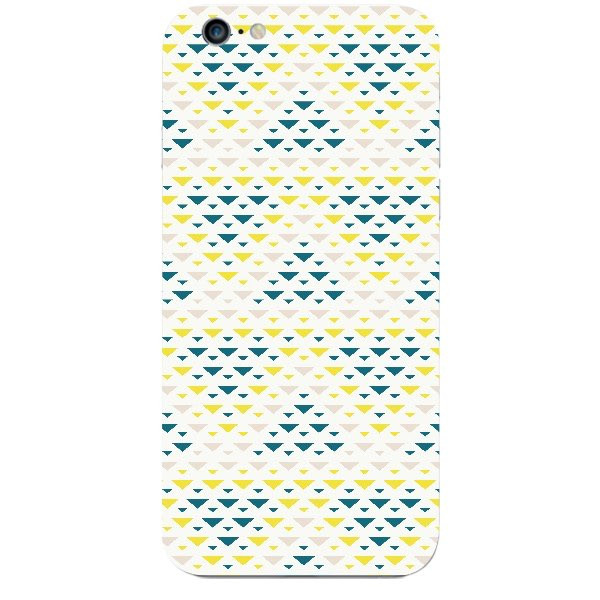
The bulk added was a lot for me but when i heard about skins that the skin4gadgets provide i went ahead and got myself one for the iPhone 6S+ and to be truthful i love the skin as it feels and looks premium, and mostly it reduces the bulk of my iPhone that was added on by the case that i put on and i simply love it.
About The Company
Skin4Gadgets offers customized skin decals for the most popular cell phones, including the Apple iPhone skins, Blackberry skins and Android skins, Along with the hottest MP3 Players & Laptops, including covers for the following Apple Mac book Decals, Apple Mac book Pro Decals, Dell Decals, HP Decals.
What does the Skin Do
Give the phone more grip
Maintains the ergonomic design the company intended for the phone
makes the phone more customised towards you
The phone is definitely grippier. While the skin is not sticky as one of those rubber cases, it does give it enough grip that I can easily pick it up off a flat surface and not slide itself off a couch arm. It’s also not too grippy, still sliding into my pocket with ease that i love.
As you guys know that the cases these days are very sharp and you have to give them credit as they definitely don't look cheap, but they add the extra bulk to your phone which you do not want. So the answer to that is install a skin to your phone. The skin i got was precisely cut and sat on my iPhone like it was not a skin but actually the body back panel.
iPhone 6S+ Skin
The only downside i found was the edges of the skin were noticeable and usually gathered dust from all around.
Pros -
High Quality
Precise Fit
Affordable
Colours are great on the skin
Skins are not only for mobiles but laptops, power banks, etc.
Easy to apply
Gives your phone basic protection
Maintains the weight of the device that the manufacturer intended the device to be off.
Cons -
Will give basic protection but do not drop your device
No Screen Protection
Conclusion
So should you buy a skin? As with most things, it depends. If you are looking for something that is going to protect your phone from a fall, this won’t do. The skin provides precisely ZERO protection to your screen if you drop it. However, if you just want to add a little grippiness or style to your phone, then this skin is a great investment.
Disclaimer -
Due to us not having our camera handy we went and picked out photos from the Skin4Gadgets website, but be sure we tested the product out thoroughly.
The Asus Zenfone Max the phone which comes in banging your door with a huge battery, and also doubles up as your power bank. And we get you the In-Detail Review of the ZenFone Max and weather is it worth taking out your hard earned cash and spending it on this phone, so let us get on with the review.
Introduction To The Asus ZenFone Max
The ZenFone Max is riding on the same ZenFone 2 wagon and gives us the great new unique look to what the next generation of the Zenfone might be like, with a huge 5,000 mAh battery, leather textured back which took total form of leather in the Zenfone Zoom. and the spec sheet worthy of a budget device on steroids.
So let's not waste any more time and get into the review of the ZenFone Max.
Look And Feel
The look is still a little bit reminiscent to the Zenfone 2 though they went with the more conventional look of placing the volume buttons on the side rather than the back of the device. The Feel of the device though is more premium than that of what i thought it would have been with the leather textured back the Metallic painted side grill and the metal buttons with the lovable rings design on the bottom of such a lovely 5.5" FHD screen is great.
Asus goes on with the tried and tested design and takes feedback seriously from their customers, making tweaks that the customers like and providing a overall great experience to the people that go in for the phone.
Specifications
Brand Model
Zenfone Max ZC550KL
Display
(5.5) 1280 X 720 HD resolution, with ASUS TrueVivid Full Screen Lamination technology, 10-finger capacitive Touch screen with Anti-fingerprint technology
16GB, Google drive 100GB free space (2year), Micro SD card support, up to 64GB
Memory
2GB RAM
Main Camera
13 MegaPixel Camera
Laser auto-focus and dual-colour Real Tone flash
Large f/2.0-aperture
Front Camera
5MP Camera with f/2.0-aperture
Network
4G LTE Cat4, 4G Download Speed up to 150Mbps
Sim Card
Dual SIM, Dual Stand by (SIM1 Support 2G/3G/4G, SIM2 Support 2G)
Connectivity
802.11b/g/n; WiFi-Direct; Bluetooth V 4.0 (EDR + A2DP)
GPS
Support GPS, aGPS, Gloness, BDS
Battery
5000mAh, non-removable li-polymer battery
Sensor
Accelerator, E-Compass, Proximity, Hall sensor, Ambient light sensor
OS
Brand-new ASUS ZenUI with Android 5.0 Lollipop
User Interface
ASUS ZenUI 2.0 with over 1000+ software enhancements like What’s Next, ZenLink, ZenMotion, Quick Access, ASUS Splendid, Kids Mode, Snap View, One Hand Mode, Trend Micro™ Security, Themes ( customize your zenfone 2 theme from many different templates), etc
Colours
Osmium Black / Pure White
Battery
The battery here is the main attraction thus the name Zenfone Max, the phone here is rocking a massive battery of 5,000 mAh which is a very bold move from Asus which is bringing a budget device in the market that contains a massive battery and also gives the high end devices like the Droid Maxx a run for their money.
The battery life is great, as we tested the battery heavily and got around 2 days of usage time from this device which mostly took us back to the days when we had Nokia's in our pockets which would go on for days on just a single charge.
This is what happened to me when i used the device normally(not on gaming and stuff, etc. just daily usage like emails, calls, etc.) i did not charge the phone for 3-4 days and went on with the usage when i thought that the device needs a charge i had lost the charger.
The device also comes in bundled with a Usb OTG Cable. On seeing the OTG Cable we thought what the hell is this for, they could not bundle in earphones but they bundled a OTG, though after digging a bit i got to know that the OTG Cable is for charging other phones via the battery of the Zenfone Max, which is a very nifty feature.
Performance
The Performance of the device was great it did stutter sometimes during heavy usage, but while normal usage it was as smooth as butter. The battery was the thing that had me very excited as it had been a lot of time since i had to not charge my phone daily at night. The performance was seamless and provided me with a great experience.
Pros -
Great battery life
Good indoor and low light shots
Gorilla Glass 4 protection
Good camera hardware with laser Focus
Cons -
Battery sealed inside
Supplied charger is weak (would have loved a fast charger with this)
A bit on the heavy side
Final Verdict -
This phone though being intended for a niche market originally, made it's way into the market being a solution for a more general problem than the usual and though being a watered down version of the Zenfone 2, is still great and surely will be useful to everyone. Keeping everything in mind even the bit heavy Asus Skin the 5,000 mAh battery still wins us over as it being a solution to a long overdue problem. Thus all being said we surely would tell you to go and buy this phone without delay.
These days powerbanks have become a necessity for people to have certainly with having such phones like the iPhones draining out the phone's battery in half a day or so, And if you do not have a good quality powerbank then your powerbank will not perform well. So here we are with a review of the Tech Armor ActivePower 12,000 mAh powerbank review.
Design
Talking about the design it’s a comparatively small size considering the power it packs. The material is plastic but it doesn’t look cheap at all. The body gives a rubberized feel with feels comfortable in hand. The product is comparatively lightweight compared other products available at this price.
It has 2 usb ports, an usb 3.0 port and a 2.0port providing 2.1A and 1.3A respectively.
The product also comes with a small flashlight which is not that good but it’s better than nothing and can be turned on or off directly by holding the power button for around 3-4 seconds and a micro usb cable to charge the device itself, The Micro-USB Cable that comes with the product is around 2m in length.
Performance
The charging speeds were pretty good even when both the ports were operating. The product took around 12 hours to charge itself using a 1A wall adapter which is a pretty good speed.
The product automatically turns on when a device is connected and can be turned off using the power button. There are 4 led on the body which works as a battery indicator. 4-LED means 85-100%, 3-LED 59-84%, 2-LED 34-58% and 1-LED 5-33%, and blinking is less than 5% or charging.
Verdict
Overall the performance was good, the build quality and design was amazing. The only thing disliked was that the product losses power at more than expected rate when kept idle. Tech Armor offers a 2 year warranty on the product and as we all know their service is great so we can expect the product won’t go bad anytime near. To sum up at $35 it’s is an amazing product carrying immense power. If you are a performance crazy or want a good looking power bank, this one is for you. At $35 the tech armor active power is a great deal and you cannot go wrong with it.
Rating
We will Rate The TECH ARMOR ACTIVEPOWER at - 4/5 Just because of the rapid idle discharging we took 1 point if it was not there then this one was a 5 all day.
Verdict - Value For Money
BUY YOUR OWN Tech Armor ActivePower 12,000 mAh Power Bank - CLICK HERE





 I never liked putting any kind of protection on my phone ever just except for a screen guard, because a case would ruin the design the company had in mind for the phone and would make it ugly that's what i thought. But now a days companies have started making phones thinner and lighter and with aluminium bodies that causes the phone to be more likely to slip from your hand.


 iPhone 6S+ Skin


 The battery here is the main attraction thus the name Zenfone Max, the phone here is rocking a massive battery of 5,000 mAh which is a very bold move from Asus which is bringing a budget device in the market that contains a massive battery and also gives the high end devices like the Droid Maxx a run for their money.


 Overall the performance was good, the build quality and design was amazing. The only thing disliked was that the product losses power at more than expected rate when kept idle. Tech Armor offers a 2 year warranty on the product and as we all know their service is great so we can expect the product won’t go bad anytime near. To sum up at $35 it’s is an amazing product carrying immense power. If you are a performance crazy or want a good looking power bank, this one is for you. At $35 the tech armor active power is a great deal and you cannot go wrong with it.