Chinese smartphone manufacturer, Vivo, has launched a new budget-oriented smartphone in their home country. Vivo Z1 Lite comes with a notched display and it is available in attractive colour options. The handset is priced at CNY 1,098 (roughly Rs. 11,500). Here are some alternatives available in India.
Asus ZenFone Max Pro M1
Asus ZenFone Max Pro M1 runs on stock Android 8.1 Oreo out of the box
In case you are looking for a better performance in exchange for better looks, the Asus ZenFone Max Pro M1 is worth a look. It features a 5.99-inch FullHD+ display. The handset is powered by Qualcomm Snapdragon 636 SoC. It comes with up to 6GB of RAM and 64GB of onboard storage. ZenFone Max Pro M1 is available in India at a starting price of Rs. 10,999.
Xiaomi Redmi 6 Pro
Xiaomi Redmi 6 Pro is available at a starting price of Rs. 10,999
If you really want a notched display, Redmi 6 Pro from Xiaomi will serve the purpose. It comes with a Qualcomm Snapdragon 625 chipset coupled with up to 4GB of RAM and 64GB of onboard storage. It comes in at a starting price of Rs. 10,999.
Those who are looking for one of the most attractive smartphones under Rs. 12,000 should look for the Honor 9N. The smartphone comes with a notched display and a compact form factor. It is available at a starting price of Rs. 11,999.
RealMe 2 Pro comes with a water drop style notch up front
RealMe 2 Pro offers the most value for your money. The dual-sim handset is powered by the Qualcomm Snapdragon 660 processor. It also comes with a water drop style notch and up to 8GB of RAM. The smartphone is available at a starting price of Rs. 13,999.
RealMe 2
RealMe 2 comes with a notch up front
If you are not willing to spend as much as Rs. 13,999 on the RealMe 2 Pro, you can look for its younger sibling. At a starting price of Rs. 9,499, the RealMe 2 comes with a notched display. It packs in up to 4GB of RAM and 64GB of onboard storage.
Now you can backup your Android device manually to Google Drive
Google now allows users to manually backup their Android smartphone to their Google Drive. The feature is currently available on a wide range of Android devices running on Android Oreo and above. Here's how the new feature works and how you can start manually backing up your data.
The backup feature has been there on Android phones for quite some time now. Earlier, the feature required the user to put the phone on charge and then the backup took place automatically. However, now the user gets complete control over when he wants to back up his device. The backup currently consists of app data, call history, device settings, photos and videos and SMS messages.
How to backup manually?
In order to use the manual backup feature, head over to your phone's Settingsand tap on Google. Find Backup and tap on that. Enable the "Back up to Google Drive" option, if not already enabled. Finally, hit the Back up now option. The whole back up process can take quite some time as it depends on the amount of data you have and your data speeds.
The manual backup option is available in Google settings
Google has not yet officially announced anything related to this new feature. The feature was first spotted by Twitter user, Alex Kruger (@Kruger2147). Since his tweet, many people have reported that they found the feature on their Android devices as well.
Google Duo giving away cash rewards of up to Rs. 9,000
Google launched its own video calling application, Google Duo, for Android and iOS last year. The company has seen that not many people have been using the application even though they have been promoting it via advertisements. Now, the California based firm has come up with an interesting idea to attract more users in India to use the new app. Google is offering up to Rs. 9,000 cash rewards if you use Duo app and here's how you can win some cash.
Google has been promoting its Pay app through cash rewards for a long time now. Now, its time for the video callling app, Duo. In India, Google is providing cash rewards to every user who makes his first Duo video call. Moreover, users can win even more cash rewards by inviting their friends and family members. When a friend signs up, both of them win a certain amount of cash reward which will be directly transferred to their bank accounts using Google Pay.
Google Duo: How to win cash rewards of up to Rs. 9,000?
In order to start winning cash rewards via the video calling app, users first need to set up the UPI based app, Google Pay. A bank account must be linked to the app using the linked phone number. Once you have Pay app set up, download the Duo app and start making calls and sending invites.
Google claims that you can earn up to Rs. 9,000 in a year using this program. Once an invited user joins the app, you will get a scratch card, which when scratched can get you a cash reward of up to Rs. 1,000. Notably, the offer is currently available all-over India except for Tamil Nadu.
South Korea might be a difficult market to crack for Xiaomi considering the dominance of Samsung and LG there.
Xiaomi has launched its new Pocophone F1 smartphone in South Korea. It will be made available to consumers via three sources - SK Telecom, KT and LG Uplus. The device will be made available for consumers to purchase starting November 19 and will start at 4,29,000 won (approximately Rs. 27,500). Xiaomi back in August launched the device with the name Poco F1 in India. It is one of the cheapest smartphones to be powered by the Qualcomm Snapdragon 845 processor combined with liquid cooling.
Some reports state that the device is already quite popular in South Korea, as many consumers have already imported the device from other countries via online shopping websites. However, South Korea might be a difficult market to crack for the company considering the dominance of Samsung and LG there. Xiaomi also launched its Redmi Note 5 smartphone in the country back in July.
Poco F1 sports a 6.18-inch IPS LCD display with a resolution of 1080x2246 pixels and a 19:9 aspect ratio. It is powered by the Qualcomm Snapdragon 845 SoC and comes with 6GB or 8GB of RAM. For storage, there are 64GB, 128GB and 256GB options. The storage is further expandable using a microSD card. Under the hood, there is a 4,000mAh battery backing the device.
On the optics front, the device sports a dual-camera setup on the back which is a combination of a 12-megapixel primary sensor and a 5-megapixel secondary sensor. On the front, there is a 20-megapixel for taking selfies.
Samsung Galaxy J4 Core features an Infinity display
Samsung has launched another Android Go edition smartphone, the Samsung Galaxy J4 Core. It sports a 6-inch HD+ TFT panel and comes with a 1.4GHz processor under the hood. The South Korean giant has not yet revealed the price and availability details of the Android Go smartphone. Here are the alternatives you can buy right now
Nokia 1
Nokia 1 is one of the first smartphones to come with Android Go
Nokia 1 is one of the first smartphones to come with Android Oreo (Go Edition). It features a 4.5-inch IPS LCD display with a resolution of 854x480 pixels. The smartphone is powered by the MediaTek MT6737M processor coupled with 1GB of RAM. It is currently available in India for a price of Rs. 4,999.
Samsung Galaxy J2 Core
Samsung Galaxy J2 Core is priced at Rs. 5,990
Samsung Galaxy J2 Core features a 5-inch TFT display. It is powered by the Exynos 7570 processor paired with 1GB of RAM. For storage, it comes with 8GB of internal storage which is further expandable using a microSD card. The phone runs on Android 8.1 Oreo (Go Edition). All of this comes in at a price of Rs. 5,990.
Lava Z61
Lava Z61 features an 18:9 display
Lava has launched another Android Go edition smartphone in India, Lava Z61. It features a 5.45-inch display and it is powered by the MediaTek MT6739WA processor. The dual-SIM handset packs in 1GB of RAM and 16GB of onboard storage. Lava Z61 comes with a price tag of Rs. 5,750.
Micromax Bharat 5 Infinity is another Android Go device by the Indian smartphone manufacturer. Just like most Android Go phones, this one also comes with 1GB of RAM and 16GB of onboard storage. Micromax Bharat 5 Infinity is available in India for a price of Rs. 5,899 only via offline channels.
Xiaomi Redmi 6A
Redmi 6A is an entry-level smartphone from Xiaomi
In case you are looking for a smartphone that runs a full-fledged version of Android, the Redmi 6A by Xiaomi should serve the purpose. At a starting price of Rs. 6,599, the Xiaomi Redmi 6A brings in 2GB of RAM and 16GB of onboard storage. It is powered by the Helio A22 processor.
While most gaming laptops can burn a hole in your pocket, Asus and a few other hardware manufacturers have managed to get some of them on the budget side. With the Asus TUF FX504, the company is targeting people who are looking for gaming laptops on a tight budget. Additionally, the industrial build and design of the Asus FX504 makes it more durable than most of the competition. Here’s our full review of the Asus TUF-series FX504 laptop.
Asus FX504 Review: Specifications
Asus FX504 features a 15.6-inch IPS LCD display with a resolution of 1920x1080 pixels and a refresh rate of 120Hz. The laptop is powered by Intel's Core i7 8750H processor. It also gets a dedicated GPU from Nvidia, the GeForce GTX 1050Ti with 4GB of GDDR5 VRAM. The laptop packs in 8GB of RAM, 128GB of SSD and a 1TB hard drive. Under the hood, there is a 3-Cell 48Wh battery powering up everything.
Price: Rs. 89,990
Asus FX504 Review: Design
Asus logo on the front lights up red
Asus FX504 has quite an aggressive look when you look at it from the outside. While the angular design lines provide an aggressive look to its casing, the subtle glow of the Asus logo makes the laptop look elegant. Once you open it up, the first thing you will notice is the graphics made around its keyboard area to give the laptop a much more intense look. The screen might not convince you that this is a laptop from 2018, the chunky bezels make it look quite old.
Asus FX504 sports a 15.6-inch IPS LCD display with a resolution of 1920x1080 pixels and a refresh rate of 120Hz, which takes the gaming experience to a whole different level. The colour and contrast of this display are not the best you can get, so this might not be suitable for something like video and photo editing, but when it comes to gaming, the faster screen does help a lot.
Asus FX504 Review: Performance
Asus TUF FX504 is powered by the Intel Core i7 8750H processor. The 8GB of RAM gives it enough room for multi-tasking, the 256GB SSD helps with faster boot and app loading times. The graphics are a bit on the average side, but can run most AAA titles if you tweak the settings a bit. During our time with the device, we tested out games like CS:GO, PUBG, and NFS Payback.
We were able to get around 120-180 fps in CS:GO with medium to high settings. PUBG being a high demanding game got a respectable 50-60fps. However, turning down the graphics a little bit helped us reach 80-90fps for an even smoother gameplay. The story was quite similar with the NFS Payback where we had to bring down the graphics a little lower to remove any stutters.
Asus FX504 Review: Keyboard and Trackpad
The keyboard is quite comfortable to type on
Asus FX504 laptop comes with a backlit chiclet-style keyboard. It is quite comfortable for both, gaming and long typing sessions. The trackpad uses Windows precession drivers, which means Windows 10 gestures work seamlessly. Tracking is quite accurate and the whole experience is pretty smooth. However, we would have appreciated separate right and left click buttons as this one reads the input wrongly at times.
Asus FX504 Review: Battery
Just like most gaming laptops, the Asus FX504 delivers a pretty poor battery life. The laptop can be used for around 2.5 to 3 hours before it needs to be plugged in. You can get little more juice out of the battery by turning off the keyboard backlighting and turning down the Windows 10 performance settings. While gaming, you will anyway need to plug-in the adapter as that is how you can get maximum power.
Asus TUF FX504 is one of the best budget gaming laptops you can get in the market right now. Sure it does come with its own set of cons like missing USB Type-C port and chunky bezels on the sides of the display. But the price of this laptop easily overshadows such issues. Also, we certainly think that companies like MSI can offer much better value for your money when purchased during a sale. However, the Asus FX504’s market price crushes through the competition making it one of the more compelling options.
Its been almost three months since Google made the announcement of the official release of Android 9.0 Pie. However, most of the Android smartphones are currently running on Android Oreo or an older version of the operating system. If you are wondering if and when will your device get the update, here's everything you need to know.
Google
Google has rolled out Android 9.0 Pie to all of its eligible devices.
As the software is made by Google, it is quite obvious that the update will first arrive in the Pixel devices. Android 9 Pie has reached to Google Pixel, Pixel XL, Pixel 2 and Pixel 2 XL via an OTA update. Google Pixel 3 and Pixel 3 XL launched with Android 9 Pie running out of the box.
OnePlus
OnePlus recently launched the OnePlus 6T with Android Pie running out of the box
OnePlus was one of the first OEMs after Google to roll out the Android 9 Pie update for its flagship smartphone. The latest iteration of Android is currently running on the OnePlus 6 and the recently launched OnePlus 6T. The Chinese smartphone manufacturer is working on bringing the update to OnePlus 5/5T and OnePlus 3/3T. The users should expect the update before the end of this year.
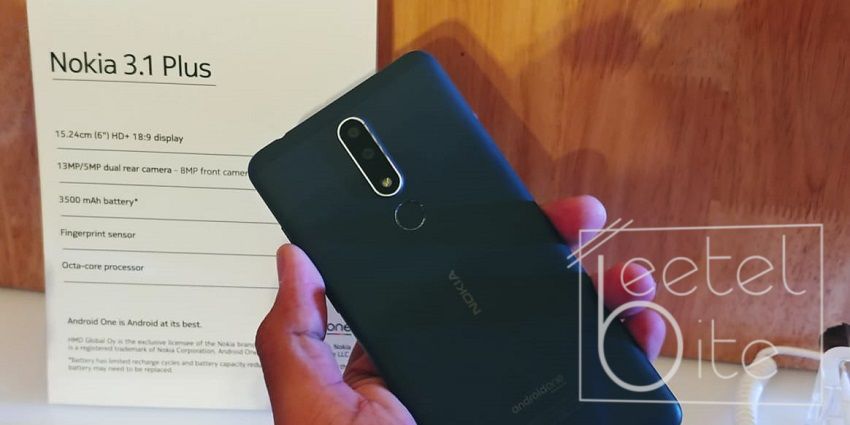
Nokia 3.1 Plus comes with a dual-camera setup at the back
Nokia has been launching its Android smartphone with the Android One by Google, which means that the updates will be quick enough on these devices. As of writing this post, Android 9 Pie is running on Nokia 7 Plus, Nokia 7.1, Nokia 6.1 and the Nokia 6.1 Plus. While the Nokia 8 and Nokia 8 Sirocco will get the update by the end of this month, other Nokia devices are expected to get the update by the end of 2018.
Samsung
Samsung Galaxy Note 9 is expected to get the Android Pie update in Q1 2019
Samsung is usually late to the party when it comes to Android updates. Due to the heavy customisations made by the South Korean giant, the updates are delayed even for the flagships. Samsung, at their developer's conference, announced that they will be soon rolling out Android 9 Pie based OneUI Beta for Samsung Galaxy Note 9, Samsung Galaxy S9 and Samsung Galaxy S9+. This means that the stable update for these devices should be available by Q1 2019. After the 2018 flagships, the company will bring the update to Samsung Galaxy Note 8, Galaxy S8 and Galaxy S8+. Once these flagships are updated, we can expect Android 9 Pie to arrive on devices from Galaxy A-series and J-series.
Motorola
Motorola One Power is the company's first phone to come with a notch
Motorola was known for providing Android updates quicker than any other OEM. However, in past few years, that has not been the case. The Lenovo-owned company has now slowed down, which is why none of their devices is running on the latest Android version. Motorola has promised that the Motorola One, Motorola One Power, Moto Z3, Moto Z3 Play, Moto Z2 Force, Moto Z2 Play, Moto X4, Moto G6 Plus, Moto G6 and Moto G6 Play will get the update soon.
Huawei and Honor
Honor and Huawei have currently not stated what all smartphones will get the update.
Huawei has refreshed its EMUI with the latest version, EMUI 9.0 that is based on Android 9 Pie. The update has not yet hit the masses. In India, none of the Huawei or Honor devices has got the Android 9 Pie stable update. However, we can expect the update for Huawei P20 Lite, P20 Pro, Nova 3i, Nova 3 and Honor Play to arrive by the end of this year.
Xiaomi
Xiaomi is already working hard on delivering the update to all its eligible smartphones.
Xiaomi has started rolling out the MIUI 10 update for many of its smartphone. However, the Android version has been updated only on the Mi Mix 2s and Mi 8 smartphones, both of which are not available in India. The Chinese firm is working on bringing the update to its flagship Poco F1 and other smartphones.
Oppo is yet to declare what all smartphones will get updated to the latest Android 9.0 Pie operating system.
Oppo has not yet announced which of its phones will be getting the Android 9 Pie update. One of the first Oppo devices to get the update will be the Oppo Find X. We should expect the update to arrive sometime in Q4 2018. The company will also release the update soon for its RealMe series of smartphones which include the RealMe 2, RealMe 2 Pro and more.
Vivo
Vivo will start rolling out Android 9.0 Pie to its smartphones by the end of this year.
Vivo has promised that they will start rolling out the Android 9 Pie based FunTouch OS update sometime on Q4 2018. However, the Chinese smartphone manufacturer has not yet revealed a list of devices which will get the update.
Facebook Lasso app is now available on iOS and Android
Facebook is now trying to compete against the popular application, TikTok. TikTok, which was earlier known as Musical.ly, allows users to create short little fun videos. All-new Facebook Lasso app does something similar and allows users to share their videos with their Facebook friends instantly.
Lasso users can record themselves while dancing on music that plays in the app itself. Alternatively, users can also lipsync on certain dialogues from movies or TV shows. The app also has a couple of video editing tools, which allows users to add text and background music to their videos.
As of now, all the videos shared on the Lasso application will be made public. Facebook says that they will soon introduce a feature where users can make their videos private and only their friends can see it.
In order to use Facebook Lasso, you can sign in using your Instagram or Facebook account. If you do not have an account on both the social media platforms, you can create a new ID on Lasso via Facebook. Do note that you have to allow the app for access to your profile page, photos and videos. Currently, you can share your Lasso videos on your Facebook stories with Instagram stories support coming shortly.
Facebook's all-new Lasso application is currently available only in the United States via App Store and Google Play Store for iOS and Android users respectively.
Xiaomi recently launched three Redmi 6 series smartphones in India including Redmi 6, Redmi 6A and Redmi 6 Pro. Out of which, the Xiaomi Redmi 6 Pro is the only one that sports a notched display. This is also one of the most budget-friendly smartphones to sport a notched display like the Realme C1. Apart from the notch, other key features of the device include a dual camera setup and a 4,000mAh battery. Do these highlights make this phone a compelling option? Let's find out:
Xiaomi Redmi 6 Pro Review: Specifications
Xiaomi Redmi 6 Pro features a 5.84-inch IPS LCD display with a resolution of 1080x2280 pixels and an aspect ratio of 19:9. It is powered by the Qualcomm Snapdragon 625 processor coupled with Adreno 506 GPU. The device packs 4GB of RAM and 64GB onboard storage. All of this is backed by a 4,000mAh non-removable battery.
Xiaomi Redmi 6 Pro Review: Design
Xiaomi Redmi 6 Pro comes packed in an aluminium chassis, which makes it feel premium in hand. However, the metal back is quite slippery. The accompanied clear case inside the retail box can help in increasing the grip.
This design has become pretty common in all Xiaomi devices
The right edge is equipped with a volume rocker and the power button. Left edge houses the SIM card tray. On the bottom edge, you will find the microUSB port, speaker grill and the primary microphone while the top edge houses a 3.5mm headphone jack, secondary microphone and an infrared sensor. As much as I appreciate the IR blaster, I was quite disappointed to see a microUSB port instead of a USB Type-C port on a phone which was launched in 2018. However, considering the price this might not be a big problem for many.
Xiaomi Redmi 6 Pro Review: Display
The display is quite good for outdoor as well as indoor visibility
The Xiaomi Redmi 6 Pro features a 5.84-inch IPS LCD display with a resolution of 1080x2280 pixels, a 19:9 aspect ratio and a pixel density of 432ppi. The notch on the top houses the front-facing camera, the earpiece and a couple of sensors. The display has a good viewing angles and it is easily visible outdoors. Even in low lighting situations, brightness can be pushed all the way down easily getting into the comfort zone for the eyes.
Xiaomi Redmi 6 Pro Review: Software & UI
Home Screen
Settings
About Phone
Xiaomi Redmi 6 Pro runs Android 8.1 Oreo based MIUI 9.6 operating system. The company’s custom UI has gotten much better over years and is quite fast and reliable now. The UI is snappy and we did not experience any lags or stutters during our time with the device. However, the custom UI does have a bit of a learning curve to it, meaning that you might struggle a bit due to the lack of an app drawer and a messed-up settings menu.
Xiaomi Redmi 6 Pro Review: Performance
Screen-on-Time
Xiaomi has launched a lot of phones under the Rs. 15,000 price bracket with the same processor. The Redmi 6 Pro is powered by the same Qualcomm Snapdragon 625 chipset found on the Redmi Note 4 from last year. However, the processor still manages to perform most of the tasks thrown at it quite easily.
Xiaomi Redmi 6 Pro Review: Camera
1 of 3
Xiaomi Redmi 6 Pro comes with a dual-camera setup at the back consisting of a 12-megapixel primary and a 5-megapixel secondary sensor. The cameras perform quite well in outdoor conditions. The level of detail is quite good and even the dynamic range comes out to be well enough. However, low-lighting scenario is where Redmi 6 Pro really tends to struggle.
1 of 2
Selfie
Portrait mode
As for the selfie camera, Xiaomi Redmi 6 Pro sports a 5-megapixel selfie shooter with a f/2.0 aperture. It does not do quite well at capturing the details but does some software based sharpening instead. There is also an option for portrait mode which totally relies on the software as there is no depth sensor involved here.
Xiaomi Redmi 6 Pro Review: Battery
GeekBench
AnTuTu
Xiaomi Redmi 6 Pro is backed by a 4,000mAh battery, which the company claims will provide around two days of battery life on a single charge. Thanks to its humongous battery and optimisations made by Xiaomi, it is able to keep up to the promise. We were easil able to get around 1.5 to 2 days of battery life with light to moderate usage. However, with heavy use, we were usually left with around 30 percent battery at the end of the day.
When it comes to filling the juice back in, Redmi 6 Pro certainly takes more than 2 hours due to the lack of fast charging as well as the 4,000mAh battery.
Xiaomi Redmi 6 Pro Review: Verdict
The box includes a clear case inside
Xiaomi Redmi 6 Pro has quite a lot to offer for the price. It also has its own set of pros and cons but the pros heavily overshadow its cons. Lack of USB Type-C and fast charging was quite disappointing, considering we are now in 2018. Considering most phones in this price bracket still come with microUSB, we cannot really complaint. Also, while MIUI has improved over years, we would have loved to see the Android One variant, Mi A2 Lite, make its way to India.
At a starting price of Rs. 10,999, the Xiaomi Redmi 6 Pro offers a lot, which makes it look like the most compelling option at this price point. However, the current competition by the likes of Asus, Nokia and RealMe will make you think twice before you lock down on your choice.
WhatsApp recently rolled out an update which allowed users to share stickers in chat. The Facebook-owned company is now trying to bring this one-step ahead its competitors by allowing users to create their own custom stickers. Making its stickers library huge, WhatsApp also allows support for third-party stickers. Here's how it works.
How to create custom stickers?
Head over to Google Play Store on your Android smartphone
Search for the app "Sticker maker for WhatsApp"
Download and install the application
Once the download is complete, fire up the application and tap on “Create a new sticker pack.” Now, you will be asked to fill in the name of the sticker pack and the author. After filling in the details, you will see a page where you can add your own custom stickers. In order to create a pack, you need to have at least 3 stickers in your pack.
Sticker Maker for WhatsApp
Now, tap on "Publish Sticker Pack" and then tap on "Yes, Publish" and now you will be greeted by a pop-up asking whether you want to add this sticker pack to your messaging platform. Tap on Add.
We are done with the app for now. You can now open up WhatsApp and head over to the stickers tab. here' you will notice that a new sticker pack is available. You can start sending stickers to your friends and family from there.