Xiaomi Poco F1 comes with flagship grade hardware at a relatively lower price.
Xiaomi Poco F1 is one of the best smartphones a person can purchase on a budget. Earlier the device used to start at Rs 20,999. Now the company has decided to be much more aggressive in its pricing strategy and has given the Poco F1 a permanent price cut in India. The company has decided to permanently cut Rs. 1,000 from all the variants price tags.
Xiaomi announced that this price cut has been made to celebrate Poco F1 selling over 7,00,000 units globally within three months. The base 6GB RAM/64GB internal storage variant will now be available for Rs 19,999, whereas the 6GB RAM/128GB internal storage and 8GB RAM/256GB internal storage variants will be available for Rs 22,999 and Rs 27,999, respectively. The devices with the new price tags will be available on Flipkart, Mi.com and Mi Home stores across India.
The Xiaomi Poco F1 sports a 6.18-inch IPS LCD display with a resolution of 2246x1080 pixels. It is powered by the Qualcomm Snapdragon 845 SoC coupled with Adreno 630 GPU. The dual-SIM handset packs in up to 8GB of RAM and 256GB of onboard storage. It runs on Android 8.1 Oreo based MIUI 10. All of this is backed by a 4,000mAh battery which supports Qualcomm Quick Charge 4 technology.
Poco F1 features a dual-camera setup at the back consisting of a 12-megapixel primary and a 5-megapixel secondary lens. Up front, there is a 20-megapixel selfie snapper.
Xiaomi recently started rolling out the Android 9 Pie update for Xiaomi Mi A2 and Mi A2 Lite. Now its time for their predecessor, Mi A1, to get the update. The Android One based smartphone has started receiving the Android Pie update via OTA (over-the-air). Here's what it brings and how to download.
While the rollout has begun, it might take a couple of days to reach your smartphone as this is a slow rollout. Once the update is available, you will receive a notification for the same. You can also check for the update manually by going to Settings>About Phone>System Update.
Xiaomi Mi A1 is based on Google's Android One program which brings pure stock experience and faster updates. So, you should expect to see all the features offered by Google on the new update. This includes adaptive battery, gesture-based navigation and much more.
Xiaomi Mi A1 Specifications
Xiaomi Mi A1 features a 5.5-inch IPS LCD display with a resolution of 1920x1080 pixels. It is powered by the Qualcomm Snapdragon 625 processor coupled with Adreno 506 GPU. It packs in 4GB of RAM and 64GB of onboard storage. Under the hood, there is a 3,080mAh battery powering up everything.
On the optics front, Mi A1 sports a dual-camera setup at the back consisting of two 12-megapixel sensors with f/2.2 and f/2.6 apertures respectively. Up front, there is a 5-megapixel selfie shooter.
Oppo F9 is supposed to be an affordable mid-segment device with amazing performance. It packs an impressive design along with great specifications. All of this combined with a competitive price makes the Oppo F9 a great device. However in this competitive market is the Oppo F9 worth it? Let's find out.
Oppo F9 Price: Rs. 17,990
Oppo F9
The Oppo F9 comes with a 1.99 GHz octa-core MediaTek MT6771 coupled with a Mali-G72 GPU and 4GB of RAM. It sports a 6.3-inch (1080 x 2340 pixels) notched IPS LCD display. For the optics, it features a 16-megapixel rear sensor with a f/1.8 aperture combined with 2-megapixel f/2.4 aperture depth sensor and an LED Flash. For the selfies, it packs a 25-megapixel front-facing camera with a f/2.0 aperture. All of this is backed by a 3,500mAh Battery.
The specifications of the Oppo F9 is nothing unusual
The device sports a plastic back panel with a gradient design. The back is extremely shiny due to which the back pattern is a bit difficult to capture under the camera. It runs Google’s Android 8.1.0 Oreo with Oppo's ColorOS v5.2 on top. The phone sports a dual sim card slots, dedicated microSD card slot, 3.5mm headphone jack and a micro-USB port for charging and data syncing. The device also features a fingerprint sensor at the back.
Design
The Oppo F9 features a pretty common design. The phone with its shiny plastic back and a semi-boxy design which looks good. The pattern at the back of the device does give it a bit of a character, however, it depends on person to person if they like the pattern or not. We personally got the Purple colour variant to review and the pattern was quite an eye-catcher.
The waterdrop notch is much better than other notch implementations.
The device sports a 6.3-inch LCD HD IPS display with a waterdrop notch. Inside of the notch, you have a 25-megapixel front-facing camera. The front sensor array and the earpiece are all placed above the notch in one of the tiniest top bezels I have seen. The display utilises LCD technology so the bezels are also required to sport a backlight. The clever use of the bezels to hide the earpiece and sensor array is appreciated. The device also features a rear mounted fingerprint sensor and a small chin at the bottom.
The back is really good looking and turns a lot of heads.
On the back, there is a dual camera setup aligned in a horizontal orientation on the top left corner of the device with an LED flash beside it. The fingerprint sensor is in the centre of the device and is in an oval shape. The phone bears the Oppo branding just below the fingerprint sensor. As the back is shiny, fingerprints and smudges are easily visible. Thankfully the company includes a case to avoid this.
Top, Bottom, Left, Right In order.
The power button is located on the right edge and the volume rocker is on the left edge along with the dual sim card tray with a dedicated micro-sd card slot. On the top edge, there is a secondary microphone for noise cancellation. And the bottom edge consists of a microUSB port for charging and data transfer along with a primary microphone, speakers and a 3.5-mm headphone jack.
With case (Left) and without the case (Right)
The smartphone looks great, however, it doesn't feel the same way for the price. The notched display might be a big push away for some people and maybe a liking for some others. Overall the design of the smartphone is great. With the reflective back, the smartphone looks gorgeous. The waterdrop notch kind off makes it more acceptable. The only flaw in the design is its plastic build.
Software
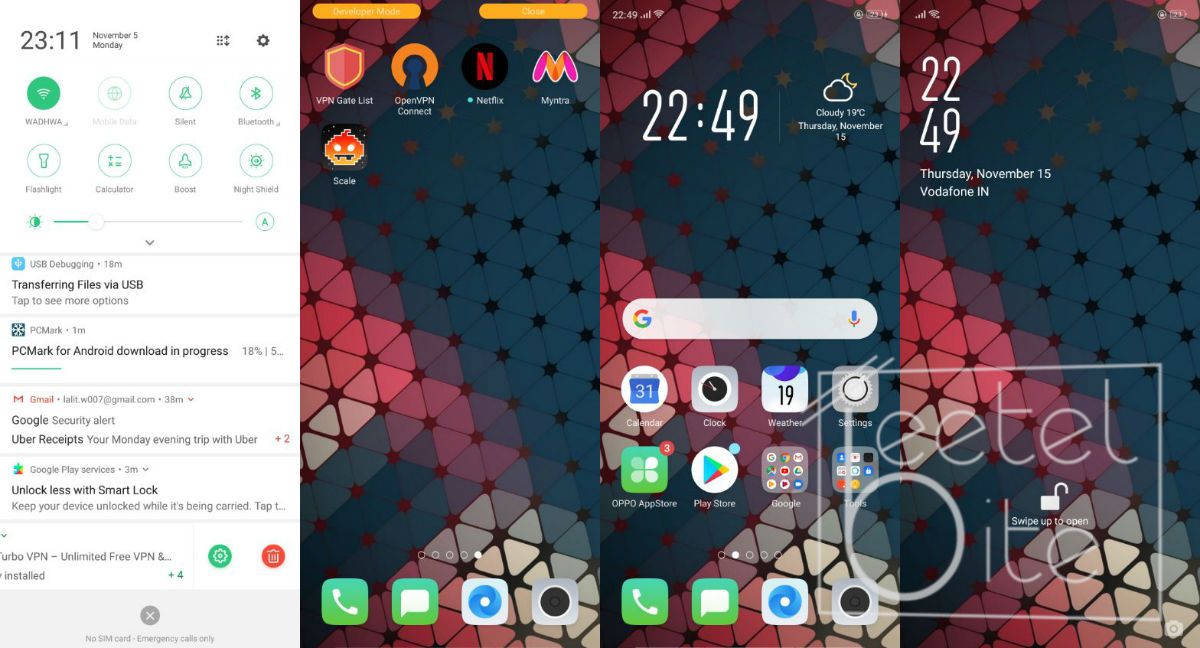
Oppo F9 runs Google’s Android 8.1.0 Oreo with the company's own ColorOS 5.2 skin on top. ColorOS is Oppo’s own skin, which it adds to all its devices to give them a unique look and feel. It offers a completely modified Android experience with its custom launcher, icon packs and some bloatware apps like Facebook, UC Browser and Amazon. These might be useful for some people but not for all. However, a plus point is that these apps can be uninstalled.
Oppo's ColorOS demands a lot of compromises.
Not everything in Oppo's ColorOS is amazing. ColorOS has a very huge learning curve for Android users. There are also some features, which are infuriating. To remove a notification from the notification bar, instead of just swiping it we need to press the smallest possible delete button after swiping it. Additionally, the notifications aren't grouped and need to be swiped out one at a time. The device has navigational gestures, which are unresponsive at most times. The software closes background services forcefully causing issues for some of the apps that require to be opened in the background to function properly. All of these small issues make using Oppo's ColorOS software quite a lot frustrating.
Performance
Performance is a major area of concern on any device, the F9 sports a 1.99 GHz octa-core MediaTek MT6771 coupled with a Mali-G72 GPU and 4GB of RAM.
AnTuTu (Left) Geekbench (Right)
We ran our usual benchmark tests test to evaluate the performance of the phone. On AnTuTu the device yielded a score of 135639, which is great considering the price and competition. On GeekBench it managed to get a single core score of 1470 and a multi-core score of 5487. The performance numbers of the device on paper were great for the value. The phone exhibits no lag during long heavy usage. Additionally, it runs extremely cool.
While playing light games such as Temple Run and Crossy Chicken, the phone runs smoothly. Heavy games like Asphalt 9 Legends and PUBG Mobile were also able to run without any hiccup.
Display
The Display of the Oppo F9 is good enough
Oppo F9 sports a 6.3-inch LCD HD IPS display with a resolution of 2340x1080 pixels. The brightness gets quite low and bright suiting all needs. The colours are okay for the display sported on this phone. The sunlight readability is great.
Camera
Oppo F9 features a 16-megapixel rear sensor with a f/1.8 aperture combined with 2-megapixel f/2.4 aperture depth sensor and an LED Flash. For the selfies, it packs a 25-megapixel front-facing camera with f/2.0 aperture. The camera sensors are good on paper. Although, not everything depends on the camera lens as we have seen in the past.
1 of 9
Outdoor
Outdoor
Outdoor
Outdoor
Outdoor
Normal(Left) and 2x Optical Zoom (Right)
Outdoor
Outdoor Low Light
Outdoor Low Light
Colours in the shots by the rear camera are good. The contrast and white balance is also great. Details on the rear camera are also good. Low light shots are good considering the price. The second sensor on the back is an optical zoom sensor instead of the telephoto or a depth sensor.
With Beauty Mode(Left) Without Beauty Mode(Right)
The 25-megapixel front-facing camera with f/2.0 aperture has a different story. The white balance of the shots is bad, which makes the photos taken look bad until and unless there was perfect lighting. Rest is the same as the rear sensor.
The rear camera on the F9 is amazing for day to day usage specifically close up shots. However, the front camera is quite bad. If selfies are the most important thing you want, then this should not your top priority.
Battery
Oppo F9 comes packing a 3,000mAh battery, which does not even last for a day on a single charge. After using the phone heavily it will die almost at the end of your work hours, which is close to eight hours meaning you will have to plug it in before the day ends. If you are into heavy gaming you will definitely need to charge it more regularly than you like. The charging time for the smartphone is around nine hours, which seems a bit tedious.
PC Mark Work 2.0 Battery Life (Left) and Battery Settings (Right)
We ran PCMark's Work 2.0 Battery Life test, which subjects the phone to heavy usage and finds out how the battery performs in those conditions. The device yielded a result of 9 hours and 47 minutes, which seems a bit low in comparison to similar battery capacity smartphones.
Conclusion
The Oppo F9 is not a great all-rounder, but that doesn't mean its not a good phone.
Oppo F9 is priced at Rs. 17,990, for which the performance and features it offers, it's a tough call to make for me whether to recommend this device or not. The software is quite infuriating but the performance and back camera module is great. The front camera is not so good, but the design is great. The smartphone is a hit or miss for me, it makes some compromises but delivers quite well on other stuff.
The Oppo F9 is not an overall great phone, but for the things it does well it is one of the best. You shouldn't purchase the F9 unless you want a top of the line front camera or a great software experience. If you can live without those two things, the Oppo F9 is a great buy.
Samsung Galaxy A8s will feature a triple camera setup at the back (Image: Weibo)
South Korean giant, Samsung is working on another A-series smartphone, the Galaxy A8s. A recent post on Weibo, a Chinese microblogging website, claims that Samsung is gearing up to unveil the Galaxy A8s on December 12, 2018. According to the previous leaks and rumours, it is going to be the first smartphone to feature an Infinity O Display.
We have seen enough leaks and rumours of the upcoming Samsung Galaxy A8s smartphone till date. While a previous post on Weibo teased the front of the smartphone, the more recent post shows off the glass back with triple camera setup and a ring LED flash that is stuck around the middle camera module.
Specifications
Samsung Galaxy A8s is said to feature a 6.39-inch FullHD+ Infinity O AMOLED display. It will be powered by a Qualcomm Snapdragon 710 processor coupled with Adreno 616 GPU. The handset will come with 6GB of RAM and 128GB of onboard storage further expandable using a microSD card. Under the hood, it will come with a 3,300mAh battery with support for fast charging.
On the optics front, Samsung Galaxy A8s will sport a triple camera setup at the back consisting of a 24-megapixel, a 5-megapixel and a 10-megapixel camera with a ring LED flash on the middle camera sensor. Up front, there will be a 24-megapixel selfie shooter punched onto the display.
Yandex Phone sports a 5.65-inch display with a resolution of 2160x1080 pixels and a pixel density of 427 PPI.
Yandex a Russian corporation with businesses like eCommerce, search engines and online advertising has launched its first smartphone named Yandex Phone. It is priced at RUB 17,990 (approximately Rs 19,000) and has been made available in only a Black colour option. This seems to be an answer from Yandex to Google, which recently launched the Pixel 3 in Russia.
Yandex has also developed its own digital voice assistant named Alice to take on Google Assistant. It comes as the default voice assistant on the Yandex Phone, with the default search engine being Yandex.
The Yandex Phone sports a 5.65-inch display with a resolution of 2160x1080 pixels and a pixel density of 427 PPI. It is powered by the Qualcomm Snapdragon 630 processor paired with Adreno 508 GPU. In terms of storage, Yandex Phone comes with 4GB of RAM and 64GB of internal storage expandable up to 128GB via a microSD card. The device runs Google's Android 8.1 Oreo operating system. All of this is backed by a 3,050mAh battery. For security, the device consists of a fingerprint scanner on the back.
Coming to the imaging specifications, the Yandex Phone sports a dual camera sensor on the back consisting of a 16-megapixel primary sensor paired with a 5-megapixel secondary sensor. While on the front, you will get a 5-megapixel selfie shooter with the capability of recording 1080p videos at 30 frames per second.
Xiaomi is now working on another smart speaker, Mi AI Touchscreen speaker. A report by Mysmartprice claims that the Chinese smartphone manufacturer has applied for Bluetooth certification for the same. The listing by Bluetooth SIG was updated on December 7, which means the speaker is about to arrive in a few days.
Apart from the touchscreen, the new Mi AI speaker also brings A/V Remote Control Profile, A2DP, Low Energy Link Layer and Low Energy RF PHY. These features will help the speaker in having a better Bluetooth connectivity. One of the more interesting parts is that the new speaker comes with Bluetooth 5.0, which offers better audio and an improved range.
Mi AI Touchscreen speaker spotted on Bluetooth SIG website (Source: Mysmartprice)
Xiaomi is currently selling multiple speakers under the Mi AI speaker line up. With the launch of Mi AI Touchscreen speaker, the firm is planning to expand its portfolio of smart speakers. Unlike other AI speakers by Xiaomi, this one is said to feature a touchscreen which will make the initial setup process a tad easier. Also, the touchscreen can be used to show various types of information.
With the launch of Mi AI Touchscreen speaker, Xiaomi is looking forward to competing against the likes of Amazon Echo Spot, Echo Show and the Google Assistant based Lenovo Smart Display. Xiaomi's line of smart Mi AI speakers uses the company's own voice assistant, which is why these speakers are more popular in China.
It has been over seven years since Google first made Android 4.0 Ice Cream Sandwich available to the public.
Google has announced that it is dropping support for its Android 4.0 Ice Cream Sandwich for future Play Service API releases. This means that version 14.7.99 will become the last Google Play services API 14 and 15 to run on Android 4.0 to Android 4.0.4. However, this might not make that much of a big dent in the overall Android install base support as currently, less than 0.5 percent of all active Android devices run Android 4.0 to Android 4.0.4.
Google with this announcement has made API level 16, which supports Android 4.1 Jelly Bean and above as the minimum level of support. Developers if willing can continue to support and maintain their apps for Android Ice Cream Sandwich users, but that seems a bit unlikely.
The apps that drop support for Android Ice Cream Sandwich will still be available on Google's Play Store in the form of forked pre and post entries. This also means many other apps that depend upon Google Play Services might seize to work at the same time.
Just to recap, it has been over seven years since Google first made Android 4.0 Ice Cream Sandwich available to the public. It was one of the major redesigns Google made to its Android operating system. As of now the active number of users has slumped by a lot, out of which most of the users might not even use these devices as their daily drivers.
USB OTG support is now available on Google's own Files app
Google has finally added USB OTG support to its Files app for Android. Files by Google, earlier known as Files Go, is a lightweight file manager application by Google. One feature that the app has been missing since its release, is the OTG support. With a recent update, the company has finally allowed users to manage files on their USB drive using the phone's OTG support.
USB OTG (on-the-go) is used quite a lot by people who do not prefer to use a laptop or desktop for simple file transfers. It can make things easier for the user as files can be directly shared between an Android device and a USB flash drive. The app is quite easy to use and shows up an option for USB drive as soon as one is connected.
Apart from the introduction of USB OTG, Files by Google's new update also brings better folder structures. It allows users to view full folder structures, which gives them a clear idea on different folders and their contents. Further, the new update also comes with some minor bug fixes and improvements.
Files Go was initially introduced with the release of Android Go program. Android Go is a lightweight operating system with apps that are specifically developed for the same. These apps can offer better performance on low-end smartphones with lesser storage and processing power. However, Google recently rebranded the Files Go app to "Files by Google."
Marvel's much-anticipated movie, Avengers 4 is finally getting closer to its release date. The movie now has a name "Avengers Endgame" and the trailer is finally out on company's various social media platforms. It is the 22nd movie made by Marvel Studios and final installment of Marvel's Cinematic Universe's phase 4. The movie will hit theatres April 26, 2019.
Interestingly, Avengers Endgame is the second movie to be shot entirely using IMAX 3D cameras. The first movie to do so was also by Marvel, Avengers Infinity War. Russo Brothers, the producers of Avengers Infinity War and Avengers Endgame, had first experimented with the IMAX cameras for the shoot of Captain America: Civil War. They enjoyed the whole experience, which is why they decided to use only IMAX 3D cameras for shooting Avengers: Infinity War and now Avengers: Endgame completely with IMAX cameras.
IMAX 3D cameras are more powerful compared to other cameras and they also come with a processing chip inside, which provides extremely good quality shots. While the work becomes more joyful for the producers, it also turns into a tedious task for the whole team including the editors. However, this makes the output much more immersive for the audience. Due to such camera technology being used, it is highly recommended that you watch this movie at your nearest IMAX Cinemas. Though the tickets are a bit more expensive compared to usual 3D theatres spending that extra cash will surely be worthwhile.
With the release of Avengers Endgame's trailer, Marvel is celebrating the 10 years anniversary of its Cinematic Universe. The movie is going to bring a long journey that started with the first Iron Man movie to an epic conclusion. Avengers Infinity War marked the loss of many of planet Earth's heroes who have also lost their families and close friends during the journey. With the help of Avengers Endgame, the heroes are going to bring this to an end. Viewers will be able to find out who survives and who doesn't in a cinema near them on April 26, 2019.
One UI is currently available under a beta program
Samsung recently started rolling out the One UI beta for its latest flagship smartphones. Currently, Samsung Galaxy Note 9, Galaxy S9 and Galaxy S9+ users are eligible to test out the new Android 9 Pie based One UI. Apart from the redesigned UI and a new icon pack, the UI also brings dozens of new features to the table. Here are the top 5 features of Samsung's One UI.
Night Mode
Night Mode will also help in saving your phone's battery
One of the most anticipated changes that the new One UI brings to the Samsung devices is the all-new Night mode. While Samsung likes to call it Night mode, it is more like a dark mode for the overall UI. It changes the system colour from white to black and makes it easier for your eyes. Also, as most Samsung phones use an AMOLED panel, this will be very useful in saving more battery.
Gesture Navigation
Google has introduced gesture-based navigation on its latest Android 9 Pie operating system. One UI being based on Android Pie also brings gesture based navigation to the table. However, Samsung's implementation here is quite different when compared to Google.
Smartphones are getting bigger over the years. With the new aspect ratio and larger displays, it is quite difficult for most people to reach all four corners of the phone easily. To solve that, Samsung has come up with One UI. It makes single handed use much easier on smartphones like Samsung Galaxy S9+ and Galaxy Note 9. While the first party app options have been shifted to the bottom, notification panel and settings app have huge text on the top, which allows everything to shift a little bit lower.
Lift to wake
One feature that Samsung devices have been missing all these years is the raise to wake functionality. With One UI, the feature has finally arrived and it wakes up the device as soon as someone picks it up. This makes the Face, Iris or Intelligent unlock a more seamless and better unlocking method.
Reorganised Settings
Apart from the visual changes, Samsung has also reorganised the Settings menu in the new One UI. The first thing that you will notice is that sections have been sorted. While Connections, Sounds and Display show up together on top, Notifications and Apps are bundled together. This makes it easier for the user to understand which settings are in which section.