Android 10 is currently available only for Pixel devices.
Google recently rolled out the much-awaited Android 10 update. While the version was expected to be named after a dessert name starting from Q, the company, later on, decided to go with numbers to decrease the amount of confusion. As the update is now out of its beta stage and many Pixel owners have started updating their phones, they have complained about issues related to the sensors.
According to a recent report, several Pixel users have faced dead sensors on their smartphones. These users came forward and wrote on the Google Issue Tracker, XDA forum, and the Pixel Phone Help forum. Due to the bug, the users are facing problems with features like Active Edge functionality, auto-rotate, auto-brightness, double-tap to wake, and lift-to-wake.
While only one user has reported the issue on the first-gen Pixel, others have found the bug on the Pixel 3 XL only. However, we have not noticed any such problems on our Google Pixel 3a.
An excerpt of the Pixel user’s complaint on Google Issue Tracker, reads, “When I make a phone call, the screen goes dark and no swiping or pressing of the power button brings the screen back on. If the call goes to voicemail, you can’s see the dial pad to respond to prompts.”
In order to fix these issues, the users either have to downgrade back to Android Pie or wait for Google to roll out another update with a fix. Although the issue is not widespread, if you have not yet updated your Pixel devices, you should consider waiting for a few days before updating it.
Android 10 can be rearranged as Android Q to unlock the secret game.
Google has started to roll out the new Android 10 update for Google Pixel devices worldwide. With the stable Android 10 release, we have a new easter egg with us to play with. Unlike the desert naming scheme, Google has kept the tradition of including an easter egg in Android since the Android Gingerbread (Android 2.3).
Generally, the way you accessed these easter eggs was, go to settings -> about device/phone and then tap on the Android version a couple of times. However, Google has become more and more innovative in hiding it's Easter eggs in the last couple of years. So we bring you a step by step detailed guide on how to access and play with the easter egg in Android 10.
The easter egg puzzle in Android 10 is basically a Nonogram. A Nonogram is a picture-based puzzle where you use the hints for the columns and rows to fill in the pixels to ultimately draw an image. All the Images what you will be able to complete in this puzzle are basically Android icons. We don't know how many are presently there or how many will be added in the future, or even if they will be added or not.
Some of the completed Nonograms
You will also need to rotate your device to see the hints for the other side which is annoying. However, if you are confused about how to play a Nonogram, this is basically how it works. If the hint says 10, then there will be 10 consecutive filled pixels in that row. If it says 1-2-2, then there will be a block of 1, then 2, then 2 consecutive filled pixels in the row. By looking at the hints in both the row and column, you will be able to pinpoint there will be filled pixels.
Samsung Galaxy Fold to be available starting September 6.
While the Samsung Galaxy Note 9 just arrived in the market, the Galaxy Fold, which was unveiled back in March 2019 has not yet hit the shelves in most countries. The company has now buckled up to start shipping the devices to the consumers as they officially launch the product once again. The foldable smartphone will be available in South Korea starting September 6.
For those who have been living under a rock, the Samsung Galaxy Fold was launched back in March 2019 alongside the Samsung Galaxy S10 lineup. The phone was even made available on pre-orders and even made to the doorsteps of some buyers. However, reviewers, as well as casual users, started complaining of an issue with the large display. The company had to stop the production and halted the shipments.
The South Korean giant now claims that the design and construction of the foldable smartphone have been improved so those issues should not repeat. With making such a statement, the company is all set to launch the product once again. Apart from that, the company will also start selling a 5G variant of the same in select countries.
Samsung Galaxy Fold sports a 7.3-inch Infinity Flex display on the inside and a secondary 4.6-inch HD+ Super AMOLED display on the outside. The device is powered by the Qualcomm Snapdragon 855 processor. The Indian variant of Galaxy Fold is expected to come with the Exynos 9825 chip. It runs on Android 9 Pie layered on top of Samsung's OneUI. All of this is backed by a 4,380mAh battery.
Samsung Galaxy Fold was launched in the United States with a price tag of USD 1,980. Considering the hefty price tag, we can expect the phone to cost around Rs. 1,50,000 when it arrives in India.
Asus 6Z's flip camera is one of the best features of it.
Asus 6z is the Asus’s latest flagship, which it launched a few months ago globally. After a lawsuit claim, the company had to rebrand their Zenfone 6 to Asus 6z in India. The Zenfone 6 or the Asus 6z offers great performance along with innovative technology at an affordable price according to the company.
However, we cannot always adhere to what the company claims, so let's find out whether the Asus 6z is a smartphone you should spend your hard-earned money on or not.
Asus 6z Review
Asus 6z is powered by a Qualcomm Snapdragon 855 processor coupled with 6/8GB RAM and 64/128/256GB of storage. There is a dual SIM card slot along with a separate microSD card slot.
The Zenfone 6/6z is a mid-range flagship smartphone.
The device sports a 6.5-inch (2340 x 1080 pixels) 19.5 aspect ratio IPS LCD display. For optics, it features a dual-camera setup on the back, consisting of a 48-megapixel, f/1.8 aperture main sensor along with a 13-megapixel f/2.4 aperture ultrawide sensor. It has a motorized flip camera, which allows the rear camera to flip out and become the front camera for taking selfies. All of this is backed by a 5,000mAh non-removable battery. It runs Google’s Android 9.0 Pie operating system with the company's own ZenUI 6 skin on the top.
The phone sports a 3.5mm headphone jack, which is something that we don't usually get to see in flagships nowadays. It also comes with a USB-Type C port and a fingerprint sensor at the back.
Asus 6z Review: Design
Design of the Asus 6z is really good. The back panel is made out of glass with an accented Asus logo and text, which looks good. The smartphone looks classy and feels great in hand. There is no wireless charging despite the glass back, which is a little disappointing.
The camera flips up pretty fast.
The speaker grille is located above the display, whereas there is no front camera as to say, so the top is completely bezel-less, which looks great. The bottom of the device has a considerably big chin when compared to the top bezel but it doesn't make much of a difference while using.
The accented text at the back looks great.
Coming to the back, Asus 6z sports a dual-camera setup paired with an LED flash aligned horizontally on the top. The camera flips to become the front camera, which is amazing. There is a small camera bump, but nothing that major. The included case in the box offers a lip around the camera to protect the lens. The fingerprint sensor is located towards the top of the device.
Left, Right, Top, Bottom in order.
The right edge consists of the volume rockers and a power button with an accented ring around it. There is also a smart button for opening up Google Assistant above the volume rockers. It would be great if it was remappable, but Google Assistant will do. The top edge ha the secondary microphone. The left edge sports the sim card tray only, while the bottom edge has the USB-Type C port along with the speaker and the headphone jack.
Overall, the design of Asus 6z feels pretty good. It looks quite classy, which according to me is a good thing. The back is made out of glass with accented text which looks good. Overall, Asus did a good job of designing the 6z.
Asus 6z Review: Software
Asus 6z runs Android 9.0 Pie operating system with the ZenUI 6 skin on the top. The software resembles stock Android with few minor tweaks under the hood for better performance and stability, which is a good thing as I wasn't a fan of the older ZenUI at all.
The almost stock ZenUi 6.0 is something every company should learn from Asus.
It is one of the cleanest and the fastest software experiences you will find out there in the Android ecosystem. It has all the bells and whistles of the Android Operating system. It also comes with next to no bloatware, which is an amazing thing. Overall, 6z's software is one of the best in the market as of now.
Asus 6z Review: Performance
Performance is a major area of concern on any device, the same goes for the Asus 6z. It is powered by a Qualcomm Snapdragon 855 processor coupled with an Adreno 640 GPU. Our review unit came with 6GB RAM/128GB storage.
AnTutu (Left), GeekBench (Right).
We ran our usual benchmark tests to evaluate how the device performs. On AnTuTu the device was able to score 358872, which is great considering the price and competition. On GeekBench it managed to get a single-core score of 3536 and a multi-core score of 11043. The performance numbers of the device on paper are quite good.
While playing light games such as Temple Run and Crossy Chicken, the phone runs flawlessly. Heavy games like Asphalt 9: Legends and PUBG Mobile and Call of Duty also run without any hiccup without much heating.
Overall, the performance of the 6z is good compared to the price a user needs to pay.
Asus 6z Review: Display
With almost no bezels, the display looks great.
Asus 6z sports a 6.4-inch IPS LCD display with a resolution of 2340×1080 pixels and comes with an aspect ratio of 19.5:9. The LCD display is disappointing considering you can get AMOLED at a comparatively lower price than this. The brightness levels are able to get super low and immensely high depending on the situation. The colours are good, as good as an LCD can portray them.
Asus 6z Review: Camera
Asus 6z features a dual-camera setup on the back. There is a 48-megapixel, f/1.8 aperture main sensor with PDAF along with a 13-megapixel f/2.4 aperture ultrawide sensor. For selfies, the rear camera flips out to become the front camera, which offers good front camera performance.
As the rear camera flips out to become the front camera, you will get the same performance for the selfies as your normal shots. Which is great because usually, companies compromise on the front camera to offer a better screen to body ratio.
1 of 8
Outside
Outside
Outside
Outside
Outside Potraigh Mode
Outside Wide Angle
Outside Normal
Inside
Images from the camera unit come out great. The colours are not highly brightened up but look natural instead. The sharpness is acceptable, and the ultrawide sensor is just great. The camera quality is not top of the line for the rear camera, but the same performance for the selfies is just great.
Overall, the camera performance of the 6z is good.
Asus 6z Review: Battery
Asus 6z is backed by a 5,000mAh Li-Po battery, which easily lasted me more than a day on a single charge. Charging time with the included charger is around 120-150 minutes, which is good.
The 5,000 mAh battery of the 6z is massive.
We tried to run PCMark’s Work 2.0 Battery Life test, which subjects the phone to heavy usage and finds out how the battery performs in those conditions. However, the smartphone's battery protection feature killed the app every time before the tests could finish.
Asus 6z Review: Verdict
Asus 6z starts at Rs. 31,999 and goes all the way up to Rs 39,999. Our 6GB RAM and 128GB storage variant cost Rs 34,999. For that price, the Asus Zenfone 6z offers one of the best overall performance.
Overall, Asus 6z is great value for the money you spend on it.
Things like an LCD display are a bummer and you can get under the screen fingerprint sensor at this price easily, but the flippable front camera, which offers amazing selfies, stock Android and generall overall design combined with the price make the smartphone a good option to choose.
Mobile Lite is a lighter and hence faster version of the famous game PUBG
Recently, Tencent Games have released the PUBG Mobile Lite globally which is a tad bit faster due to it being a lighter version of the PUBG Mobile. This update received massive success all around the world for a wide number of devices. This week the game users are getting Lite-specific in-game rewards.
Like PUBG Mobile's Royal Pass, PUBG Mobile Lite sports a WinnerPass which are similar to each other. This system allows players to participate and complete in-game challenges and get exclusive and rare in-game rewards. Tencent Games is celebrating the success of the game and released a massive 0.14.0 content update with an all-new in-game event.
The game is offering rewards for its players to celebrate the success of the game
From now until Sunday, Sept 15th, players who log into PUBG Mobile Lite for a total of 10 days will receive a WinnerPass Season Upgrade card to unlock Elite WinnerPass Season 4 for free of cost. Also, there are various other challenges as well in the game which will offer many exciting skins, costumes and more for its players.
The in-game event comes just a limited period of time after the game earned the most popular mobile game on numerous global charts in its available regions including Turkey, India, Russia and certain regions of the Middle East. It has already claimed the number one spot among free-to-download games in multiple regions and received a “New Game” recommendation and promotion on Google Play Store.
PUBG Mobile Lite is now available to download and play on the Google Play Store in several regions of South Asia, Africa, and East Europe. The game boasts a smaller download size and supports more mobile devices. The game is able to run smoothly on devices with less than 2GB RAM.
The newest version of Android running on Google Pixel 3a is really smooth
Android 10 (Android Q) is in process of rolling out to all the Google Pixel smartphones right now. The list of devices running the latest Android will grow with time. Google has replaced the naming scheme of Android versions ditching the public desert codename in favor of more streamlined numbers. We took a loot at the beta to give you updates as they become live. Now that Google has released the stable version, let's check out the top 5 features google has brought in.
Google is adding Bubbles API in Android 10. This means chat heads like the facebook messenger can now be supported natively in Android. Due to it being natively supported, we can see many applications implementing these features for various thing making life easier for the users.
As you can see in the attached images above, Bubbles is working with the Google Phone app. By leaving an active call, the bubbles API is triggered. A bubble appears on the screen which can be used to quickly perform actions in call without going back to the call screen.
Sharing your Wi-Fi network password when guests visit your home can be awkward. You might not remember the password or it may be too awkward to tell. With Wifi QR codes in Android 10, you can easily share the Wifi with another person via a QR code or just see the password of the wifi you are connected to. Just go on the Wifi settings, click on the connected wifi and then click on the share button. It asks for your password to make sure someone not intended cannot gain access to your wifi which is a good security measure.
Now you can undo accidentally removed apps from your home screen setup
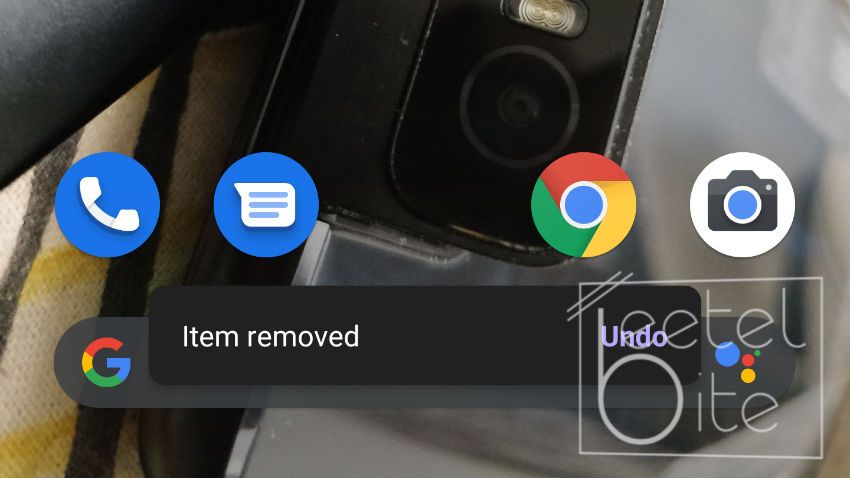
There are a lot of times when you accidentally remove an app from the home screen and don't remember where you placed it in your perfect setup or what that app even was. Well, looks like executives at Google face the same problem and they have a solution for that in the new Android 10.
After you remove an application, there is a popup at the bottom of the screen with an undo button for about 5 seconds. Press the undo button and the app will be back at its original position on your perfect home screen setup.
Android is finally getting more hold over how apps can use the user's location. Right now, its whether the app has the user's location data access or the app doesn't have that. With Android 10 that's all gonna change. The user can choose the third option to only grant access to the location when the app is open. This works much like the location permissions in iOS.
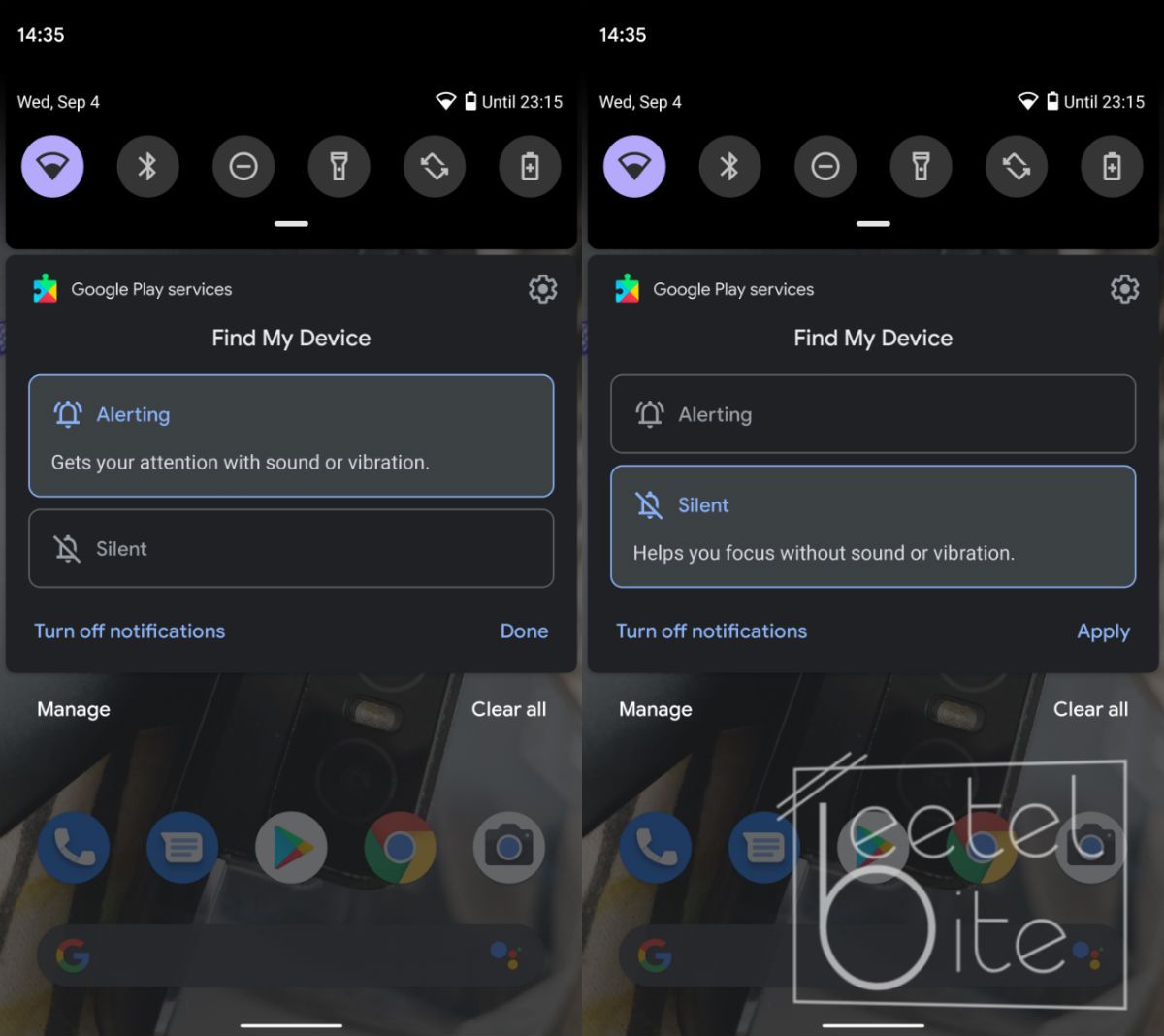
Android 10 offers better Notification controls for all Notifications
When you long-press a notification alert, you're now presented with two different options, Alerting and Silent. Selecting Alerting will allow the app to make sound with each new alert, as well as place an icon in the status bar, like it, used to work. Silent will not make a sound, but its icon will appear in the status bar up top.
Android 10 stable is rolling out to All Pixel devices.
After several betas and months of waiting, along with speculations about the new gestures and the system-wide dark theme, Google is finally rolling out the Android 10 (Android Q) update to all Google Pixel devices worldwide now. Also, unlike every year, Google promised that they are working with a number of partners to launch or upgrade devices to Android 10 this year. This means the update should reach other devices sooner than usual.
Some of the few new headline features in Android 10 include stricter permissions and privacy controls, a Focus Mode for disabling distracting apps, simpler notification controls, better-integrated family controls, a new system navigation gestures, and a new Dark Theme.
However, most of the Android 10's major features will remain invisible to most of the users for a long time. Features like the Project Mainline will allow Google to push updates like the security patch using the play store instead of OTA via the manufactures. This will enable devices to get those updates faster than they would. However, it won't be simple for manufacturers to support the feature as it requires changes to the android system architecture. We have a more detailed post about the same here.
However, not all features of the Android Q beta are available right now. Features like the Focus mode is launching in beta right now and the Live Caption will launch later this year and will be Pixel-exclusive for a while.
The 10th version of Android is also the first version since almost the beginning of
Android that doesn't have a public desert-based code name. Google made the switch stating the fact that the desert names are confusing and can mean different in different parts of the world.
With the Android 10, there are many small features that don't get much attention in coverages. Google is highlighting more gender-inclusive emoji, app timers for specific websites, and support for streaming audio to hearing aids.
How to get the Android 10 update?
If you own a Pixel device, you should automatically get the notification that your device is ready to update. However, Google always rolls out in phases and you might not get the update for the next 2-3 days. You can always go to Settings -> System -> Advanced -> System Update to check for updates manually. If you don't own a Pixel device, the update could days weeks or even months to reach your device depending on your device manufacturer.
Gaming laptops are generally priced higher than the usual consumer market due to the various modifications required to game even on high-end hardware. With the introduction of the AMD Ryzen 5 series processors and their aggressive pricing strategy along with Asus trickling down ROG technology into its Tuf line-up of the laptop, the Asus Tuf series of laptops powered with Ryzen 5 has gotten a lot cheaper.
The Ryzen 5 powered Asus Tuf FX705 brings a lot to the table for its price is able to create tough competition in the market. However, does it match up to the needs of gamers and normal users in the real world? Find out in our review below:
Asus Tuf FX705 Review: Specifications
Asus Tuf FX705 is available in a variety of configurations. The variant we had for review purposes came with an AMD Ryzen 5 3550H Processor coupled with a Radeon Vega 8 GPU. The laptop even sports a dedicated AMD RX 560X graphics card along with 4GB of GDDR5 VRAM. It comes with a 17.3-inch IPS LCD display with a resolution of 1920×1080 pixels anti-glare panel. The device also packs in 8GB of RAM and a 1TB hard drive.
Asus Tuf FX705 Review: Design
The Asus Tuf FX705 does not look very attractive but the red accents and the angular lines give it kind of an aggressive look. The laptop is quite bulky, which is probably due to the high amount of cooling elements inside to keep the internals from frying up during heavy gaming sessions. Also, the 17.3-inch display means it is very large to be carried around anywhere easily.
The outer shell is made out of plastic with a brushed aluminum like feel to it. The red accents along with the red Asus branding and the red backlight on the keyboard along with angular lines everywhere just to enhance the look and make like an angry bull.
The 17.3-inch display with something the company calls nano-edge display sports very small bezels making it look a little better and decreasing the size a bit. The brushed aluminum feel to the body looks and feels really good and keeps the fingerprints away.
Overall, the design of the Asus Tuf FX705 is very aggressive looking and purposeful. The company claims that it has passed the MIL-STD 810G standard but not what tests it has passed, so it is a little durable at least.
Also Read:
Asus Tuf FX705 Review: Display
Asus Tuf FX705 sports a 17.3-inch IPS LCD panel with a resolution of 1920×1080 pixels. It is quite impressive to see a Full HD panel with that big display at this price range. Also, the display is anti-glare so it helps when working in direct sunlight outside which you wouldn't want to cause of its massive size and weight. Media consumption such as movies is such a great experience cause of the massive 17.3-inch display panel. The color accuracy is good and the anti-glare matt display helps with the light a lot.
Asus Tuf FX705 Review: Performance
The laptop is powered by the AMD Ryzen 5 3550H processor with 4 cores and 8 threads. It comes with a single 8GB RAM stick installed, which is quite enough for most use case scenarios and also has room for upgradeability.
1 of 2
Cinebench
Geekbench
One thing that the machine lacks is an SSD, which is a necessity especially with the Windows 10. Notably, the laptop does have an M2 PCIe slot, which enables you to upgrade it and add an SSD later if you wish to.
As for the gaming performance, the device is easily able to play all e-sports titles such as Counter-Strike: Global Offensive. In order to gain higher frame rates, you will need to bring down the graphics a little bit. Heavier games like PUBG and Battlefield V can also run, but with graphics turned to medium or low.
Also Read:
Asus Tuf FX705 Review: Keyboard, Trackpad, and IO
The laptop comes with a backlit chiclet-style keyboard. It is quite comfortable for both, gaming and long typing sessions. However, the laptop is too wide because of the 17.3-inch display, and this means the keyboard would either have large bezels or a wide placing in between the keys. The Asus has a wide spacing in between the keyboard which is something not everyone would like. The trackpad uses Windows precession drivers, which means Windows 10 gestures work well. Both the keys and the trackpad have red accents around them, giving it a gaming vibe.
The red backlighting on the keyboard makes it to much aggressive. The key travel is good enough and the feedback is from the keys is great.
The IO on the Asus FX705 is good but disappointing considering the size. The right side is barren even no CD player. The CD player has gone absolute these days, but the laptop has so much space, they could have easily added one in. The left side has a 3.5mm jack along with two USB 3.0 Gen 1 ports and a USB 2.0 port. You also have an HDMI port along with an ethernet port and a charging port.
Asus Tuf FX705 Review: Battery
Most gaming laptops do not provide a good battery life, same is the case for the Tuf FX705. In normal use case scenarios including web browsing, using a couple of apps, and a few hours of media playback, the laptop delivers a battery life of around three and a half hours. However, tinkering around with the Windows performance modes and a few other settings can, you can bring it up to around five hours. The charging time with the included charger is around 1.5 hours which is normal.
Asus Tuf FX705 Review: Verdict
Asus Tuf FX705 is hands down one of the best gaming laptops under Rs. 60,000. The review specification retailing for a little over Rs 59,999. With the weight of the machine and the massive size, it is hard to carry around a laptop.
The gaming laptop segment has gotten a lot cheaper, and thanks to the aggressive pricing of the Ryzen 5 series of processors the laptop is a good value for money. It won't blow you out of your mind, but considering the price it a good laptop for gaming.
So, if you want a laptop mainly for gaming purposes, the Asus Tuf FX705 is a good option. However, if you want to use it as a work or a school laptop as well, the massive size and the weight will surely be something to make your experience not so good. I would rather suggest going for the 15.6-inch display so decrease the size making it a little easier to carry. Overall, you won't be disappointed with the whatever variant you choose to go with.
Smart Television help bring the power of IOT to the big screens
In the second half of 2019, Chinese manufacturers are now looking to expand in the Television segment. After the mobile market, it's the Televisions which are getting smarter every day. Xiaomi already has it Mi TV lineup selling great while Huawei is looking at launching Huawei and Honor branded smart Televisions. OnePlus has already announced its intentions to make a smart TV.
With all that in mind, what is the best smart Television to buy. We have traditional brands such as Samsung, LG, Sony and on the other hand, we have new Chinese smartphone manufacturers looking to dip their foot into the big-screen market. Here are the Top 5 Smart Television available to buy right now.
Redmi 70-inch TV
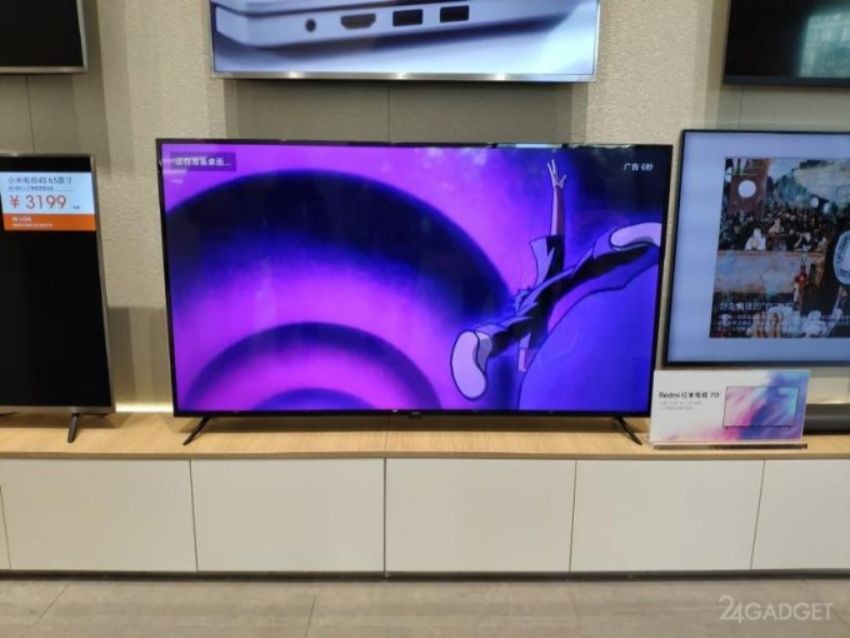
Xiaomi's sub-brand Redmi unveiled their own lineup of smart TV's recently at a lunch event in Beijing. Their flagship is a massive 70-inch 4K display with HDR support and sports the same PatchWall UI as seen on the Mi TV series. It sports a fairly simple design along with minimum bezels and an ability to wall-mount or left on the table using a stand.
Redmi Smart Television is a great value for money.
The device is powered by a quad-core 64-bit Amlogic SoC combined with 2GB of RAM and 16GB of onboard storage. Along with that, it sports various audio technologies such as Dolby Audio and DTS HD. It is currently retailing at a very affordable price of 3,799 yuan (~Rs 38,000).
Honor Vision 55-inch TV
Honor unveiled it's Vision and Vision Pro smart display's powered by Harmony OS, the alternative to Android OS developed by Honor's parent company Huawei. The Honor Vision sports a 4K UHD display 55-inch display with a 94% screen-to-body ratio. It is capable of brightness up to 400 nits. It sports an adjustable Pop-Up camera with 6 far-field microphones for 1080p video calling at 30fps and voice control.
Honor Vision Pro is powered by Harmony OS
Honor Vision begins at 3,799 yuan (~Rs 38,000), while the Honor Vision Pro retails for 4,799 yuan (~Rs 48,000).
Xiaomi, the biggest smartphone brand in India and China has been in the Television segment for quite a while now. The company holds about a 40% market share of smart TVs in India. The companies most famous product is a 65-inch 4K device with HDR and a refresh rate of 60Hz. the device is the world's thinnest smart television coming in at 4.9mm if you believe Xiaomi.
It runs on Patchwall, deep learning AI TV system developed by Xiaomi specifically for this purpose. It learns user preferences and classifies content to offer more curated content to the users. Although, it could do with few algorithmic changes under the hood.
Samsung Smart TV
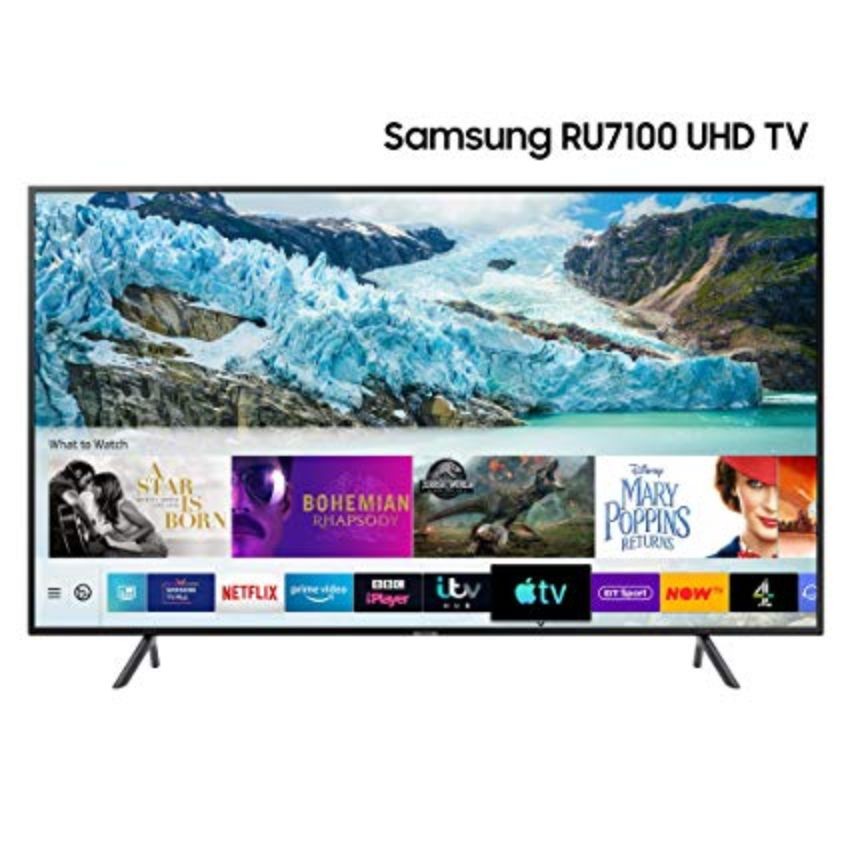
Samsung is one of the biggest names when it comes to the television market. The company was one of the first to venture in the smart television segment. The Samsung RU7100 TV sports a slim design along with 4K resolution and HDR support. The 55-inch variant of the same generally retails for $600(~Rs 43,000). It has support for Apple TV, BT Sport and NOW TV apps, allowing you to catch up to your favorite shows in the best of quality.
Samsung makes one to the best smart televisions in the market.
It can also be used as a smart home hub through smart speaker assistants such as Bixby, Alexa, and Google Assistant inbuilt. For Apple users, all that’s needed is to have AirPlay 2 built in to control other smart devices using Siri for a perfect combination.
OnePlus destroyed the smartphone market with OnePlus One back in 2014. It has been doing exceptionally well since then. Now it wants to spread its wings into the Television segment. The company promised to bring a Television into the Indian Market in September 2019.
OnePlus TV will compete against Mi TV in India.
According to the company, the new Smart TV will come with a 55-inch QLED panel and have Android TV OS at its heart for top of the line performance. QLED panels are generally better compared to regular LEDs and generally provide a better viewing experience. OnePlus is aiming to compete in the Premium segment so it will be priced accordingly.
OnePlus TV is expected to aim to a more premium segment.
OnePlus, the company knows for launching a great value for money smartphones, have promised that they will bring a smart TV in India. It will run on Android TV OS and is expected to have some variant of Oxygen OS skin. As it will be running on Android OS, it will have Google Assistant, Chromecast and Play Store inbuilt. Although there is no official date announced, the company has said, it will launch the product in September only. It is expected to that it will launch on September 26 along with the OnePlus 7T and 7T Pro.
Exclusive to India
The company confirmed in a recent press release, that the upcoming OnePlus TV will be running on Google's Android TV platform. The company also stated that it will “extend its smartphone UI work with Google to its smart TV,” which means it will be running an Oxygen OS skin on top. It also stated that the TV will be sold exclusively in India.
OnePlus CEO Pete Lau is known for sharing photos and leaks about the unreleased OnePlus products. He took on twitter recently to share two images of the upcoming OnePlus TV in the packaging process. We can see the TV being packed and the tests being run before packaging.
Last week, our first #OnePlusTV came off the production line - a truly monumental moment. Within this box you'll find over 2 years of dreams, milestones and of course an amazing TV. Proud to seal the very first box, and can't wait for you to see it! pic.twitter.com/hFuChx6bJW
A listing for the OnePlus TV recently popped up on Google Play Developer Console where it was said to be powered by a Mediatek chipset. The Chipset was a Mediatek MT5670 coupled with 3GB RAM.
There is a Notify Me page for the TV already live on Amazon India. Those who are interested can head over to the website right now and register for updates regarding the launch to open sales.
Image and audio quality
OnePlus TV will compete against Mi TV in India.
OnePlus teased that it will be using QLED panels for the OnePlus TV. As QLED is more expensive but offers superior brightness and picture quality, it is sure that the company is aiming for more on Image and Audio Quality and less on price. According to various reports, the TV will come with a 4K resolution, however, it is still a rumour as of now.