Google Maps now gives information on public transport in India.
Google India has just announced a couple of upcoming changes for the much-popular app, Google Maps. The application is used worldwide and over the years it has received plenty of useful features via updates. One of the more recent changes is the two-wheeler mode introduced especially for India. Now, the company has a new set of features in mind.
Now, with the new update, users can get real-time information about local buses as well as live train status for the Indian Railways. While we already had some part of the information available, the company is looking forward to making it even better with more detailed information. The app also gets a much-awaited mixed-mode commute feature, which finds routes that combine auto-rickshaws and public transport.
When Google's Google's live traffic data is combined with public bus schedules, the Maps app can give more accurate travel times via public transport in real-time. As this feature is a slow rollout, only cities like Bangalore, Mumbai, Hyderabad, Pune, Lucknow, Chennai, Mysore, Coimbatore and Surat will get it first.
While Indian Railways trains are usually late, now your upcoming train schedules will be just one click away with Google Maps. The company has also added information regarding delays, travel times and more. The app will even allow users to search for their destination and get details for the trains available. It was developed with the help of Where is My train app, which was acquired by Google last year.
OnePlus 7 finally gets the much awaited Fnatic Mode.
OnePlus recently launched the OnePlus 7 and OnePlus 7 Pro smartphones. While the Pro variant went on sale weeks ago, the OnePlus 7 has just become available to the masses. As soon as the phone went on sale, the Chinese smartphone manufacturer rolled out a new OTA update to introduce a couple of new features.
The first OTA update for the OnePlus 7 is labelled as Oxygen OS 9.5.4 and it weighs in at around 223MB. The update introduces a new feature called DC Dimming, which basically ensures that the phone's screen doesn't flicker at low brightness settings. Apart from that, the update also brings in the much awaited Fnatic Mode as well as some optimizations for the fingerprint unlock and the photo quality.
As this is an OTA update, the OnePlus 7 users will get a notification as soon as the update is available. If you want to manually check or the update, head over to Settings > System > System updates. The update has just started rolling out and it might take a week or two before reaching every smartphone.
OnePlus 7 is the company's latest flagship smartphone that comes with the Qualcomm Snapdragon 855 processor. It sports a 6.41-inch AMOLED display with a waterdrop style notch. The device packs in up to 8GB of RAM and 256GB of onboard storage. All of this is backed by a 3,700 mAh battery.
Xiaomi's sub-brand Redmi recently launched a new series of smartphones, the Redmi K20 series in China. The company is finally gearing up to bring the Redmi K20 and K20 Pro to India on a July 15. Manu Kumar Jain, the Global VP of Xiaomi recently made the announcement via his official Twitter handle.
In a new teaser video of around 30-seconds, Manu promised that the upcoming smartphone will be “a big, big knockout.” As per the teasers, the Redmi K20 and K20 Pro will arrive in the country as the "Ultimate Flagship Killer”. The announcement of the upcoming Redmi K20 might also mean that we will not see any Poco F2 and the K20 will take its place.
As far as the specifications are concerned, the Redmi K20 is powered by the Qualcomm Snapdragon 730 processor coupled with up to 8GB of RAM. It features a 6.39-inch AMOLED display with a resolution of 2340x1080 pixels. The device will pack in up to 256GB of onboard storage. All of this is backed by a 4,000mAh battery.
The K20 Pro, on the other hand, comes with a Qualcomm Snapdragon 855 chipset coupled with the Adreno 640 GPU. The device comes with up to 8GB of RAM and 256GB of onboard storage.
As for the pricing, the Redmi K20 and K20 Pro are available in China for a starting price of CNY 1,999 (roughly Rs. 20,000) and CNY 2,499 (roughly Rs. 25,000) respectively.
Avita Liber 14 comes in a variety of colours including urban ruby.
Avita unveiled their Liber series of laptops a few months ago aiming at the market which only a few other laptop manufacturers have ever touched before. Laptops that can be used as a fashion statement and can also perform as good as other laptops. The Liber 14 is a thin and light laptop that comes in various colour options and design patterns to make your workhorse a fashion statement. So are the new Avita Liber laptops worth the premium this company is asking for them?
Avita Liber 14 Review: Specifications
The specifications of the laptop are an indication of how the laptop will perform.
Specifications of the review unit we got include a 14-inch IPS LCD display with a resolution of 1920×1080 pixels. It is powered by the seventh generation 1.2Ghz Intel Core i5 Y-series processor (7Y54) coupled with integrated UHD Graphics 615. The device comes with 8GB of RAM and a 256GB SSD for storage.
Avita Liber 14 Review: Design
Avita Liber 14 looks like a thin and light metal built laptop from a distance. While the thin and the metal build parts are mostly true, it is not as light as other thin and light laptops seen in the market. The laptop feels sturdy due to its high-quality metal build quality, but that also makes it heavy to hold compared to its competitors.
The touchpad is big, massive and has an unusual shape, more on that later. As for the keyboard, it has good key travel and has a very high actuation point which makes it stressful on the hand while typing long articles like this review.
The pattern on the top of the laptop does look fashionable.
Edges of the Liber 14 are neatly bevelled giving it a nice minimalist look, mimicking the look of the MacBook Air while giving it a comfortable grip in hand.
The rubber feet at the bottom are coated for a long life but that makes their grip very weak. You can easily push the laptop with one finger on the table which is not a really good thing.
Avita Liber 14 Review: Display and IO
Avita Liber 14 sports a 14-inch full HD (1920 x 1080) IPS display. With the display being reflective and it attracts fingerprints quite easily. The panel gets dim enough for indoor usage at night without hurting your eyes and bright enough for outdoor usage.
The display on the Laptop is pretty good considering the price.
Viewing angles of the laptop are quite good, the text is legible even at all angles and in most lighting conditions. The display colours are neither too sharp nor too faded. They appear a little brighter than natural but it is really hard to notice.
The speaker situation on the Avita Liber 14 is a bit complicated. They are loud but not that clear. While listening to EDM music the performance is great, just tone down the volume to like 80 percent to get the best results. On things with more dialogue, the speakers show how bad they really are. You can easily notice the disturbance while watching movies or listening to pop or rap songs. I would strongly suggest to pair them up with good headphones for the best experience.
The Avita Liber 14 is not short on ports.
Coming to the IO (Input Output) ports on the Liber 14. It sports two full-size USB ports, one on each side, a mini-HDMI port, a micro-SD card reader, 3.5mm audio jack, a charging port, and a USB Type-C port. Exclusion of a DVD drive and Ethernet port was done to decrease the thickness of the device.
Honestly, in the modern world, I don't personally see a need for a DVD drive so its exclusion won't affect most of the people. Also, WiFi is quite common these days, so the exclusion of an Ethernet port might not be an issue for some, but I would have preferred it.
Presence of only two full-size USB ports does bother me a bit, as both of them will vanish if you decide to use an external mouse and keyboard with the laptop. Presence of the USB Type-C port helps with overcoming all of that if you are willing to live that dongle life.
Avita Liber 14 Review: Keyboard and Touchpad
Avita Liber 14 sports a chiclet-style keyboard, with two levels of backlighting for usage in a dimly lit room. The keys on the keyboard are flat and feel a little cheap. The tactile feedback from the keyboard is not that good and the high actuation point makes it really stressful to type on the keyboard, especially long articles like this review.
The placement of the trackpad is horrible.
The touchpad on the Avita Liber 14 is a completely different story. It is broader than usual to provide for a big trackpad experience which is great which browsing the internet. The feel of the trackpad is not that great, but there are bigger issues to look on that. Due to the immense breadth of the touchpad, while typing 90% of the time my palm rests on the trackpad which causes accidents clicks at the time moving the cursor to undesired location giving you a headache to type.
If you decide not to rest your palm on the touchpad, you can access the middle section of the keyboard while making for an awkward typing position for the keys that you can reach. If you decide not to rest your palms on the laptop at all, it becomes painful after a while due to the high actuation pressure of the keyboard and the way we are used to interacting with the laptops, and still a slight touch to the trackpad accidentally spoils your mood to an extent you can't adjust to. The only alternative is to disable the touchpad and use an external mouse which decreases portability.
I tried to write this whole review on the laptop with different methods to avoid the touchpad issues I am around halfway through and my hands are paining and I am frustrated fixing the issues caused by cursor accidentally moving. Due to the high actuation pressure and the touchpad issue, typing on the Liber 14 an actual nightmare.
Avita Liber 14 Review: Performance
Performance is one of the most important specifications to look at while testing any laptop. The Liber 14 we had comes with a 7th Generation Intel Core i5 7Y54 Y series processor clocked at 1.2Ghz. It comes packed with 8GB of RAM.
The power button looks like a fingerprint sensor, but isn't one.
Upgradability options are quite limited with this one. For storage, you only have a 256GB SATA3 SSD. There is no space to add a separate internal hard drive. So the only way to get more storage is a bigger SSD, which is a disappointment. The graphics onboard are handled by an integrated Intel UHD Graphics 615 chip.
While things like booting, application launches, and everyday tasks happen quite fast due to the SSD. Opening and working with multiple tabs on Chrome along with multiple applications open in the background, the 7th gen Y series processor starts to show its limitations. With around 10-15 tabs open on chrome streaming to music on youtube and downloading files, the tab changes showed a lag. Interestingly enough as I was writing this the chrome froze and reloaded all the tabs after a few seconds which reverted the article to last saved time which was 2-3 lines gone.
Also, the right side of the metal underbody of the Liber 14 heats up after a while of just watching a movie on Netflix for about 30 minutes. With temperatures hitting up to 50-degree Celsius, the heating issue will be a real problem.
Avita Liber 14 Review: Battery
Writing and looking up websites for reference while listening to music at full volume with about ten Chrome tabs open and running a few downloads in the background. With those being the things I usually do during my workday, the battery lasts approximately five to six hours depending on various factors.
It is worth noting that in my use case, the brightness is set to around 75 percent most of the times. Pushing the brightness to 50 percent where it is more comfortable in long usage sessions, with power mode set to better battery, you can easily get around an hour of juice more.
However, there was an issue, which might be limited to our review unit's manufacturing defect we had to plug in the laptop for around 7-8 hours to get a full charge which made it worthless to use. We believe it was a manufacturing defect limited to our review unit only so we cannot comment on charging times.
Avita Liber 14 Review: Verdict
Avita Liber 14 is a modern thin and stylish computer that looks great and sports a not so minimalist design. The laptop is designed for style on the move while sporting the performance to back it all up.
Overall, the Avita Liber 14 is a niche product offering, which offers very less in terms of performance and high in terms of looks.
While the style part is questionable, our Urban Ruby variant with a flower pattern printed on the lid looked more like a fashion accessory than a laptop, which accomplishes the style part. While about the performance, the laptop doesn't offer any great performance. The Y series processor is sluggish and the other specifications are fairly standard.
The review unit we had cost Rs. 57,490 and the performance it offered for the price was truly bad. Even the fashion accessory part of the laptop is not enough to justify that hight of the price for the specifications are performance.
The issues with the trackpad and keyboard are enough to keep me away from it. Overall, the Avita Liber 14 is a good all-rounder that is a bit more expensive. However, considering they are the only one offering such customizations you can snag one up if you value only the looks feel and nothing more.
Apple WWDC 2019 event will start, Monday, June 3 at 10:00 AM PT/1:00 PM ET, which converts to 10:30 PM IST.
Apple will be holding the opening keynote for its Worldwide Developers Conference (WWDC) 2019 in San Jose, California. At the event, the company is expected to showcase a number of its software products including new versions of its iOS, MacOS, WatchOS and TVOS operating systems. It is also expected that the company will announce or tease a few hardware like the Mac Pro.
The event will start, Monday, June 3 at 10:00 AM PT/1:00 PM ET, which converts to 10:30 PM IST. The event will be held at the McEnery Convention Center in San Jose, California.
Apple will be livestreaming the event on its Events page, which can now be accessed with most devices in a standard web browser.
Apple TV owners can also watch the event livestream via the Apple Events app available on the company's App Store. The app also has an archive of all of the company's older events, some of which you can binge ahead of the WWDC 2019 live keynote.
At the event, the company is also rumoured to be launching a successor to the iPhone SE, which was launched a few years back. However, that seems highly unlikely considering that Apple already offers an affordable smartphone in the market, dubbed iPhone XR.
As of now, nothing is confirmed as to what Apple plans to launch at WWDC 2019. We will just have to wait and see what happens at the event.
PUBG Mobile 0.13.0 update to bring Deathmatch mode.
Recently, PUBG Mobile received a new 0.13.0 update, which was made available to the users on May 31 globally. The version is still under beta, so only the players in the beta program and get it for now. One of the biggest and much-awaited changes that come with the update is the new Deathmatch mode. The mode is quite similar to what we have seen on Call of Duty Mobile.
The upcoming Deathmatch mode will soon be available on the stable version of PUBG Mobile along with the already available Quick Match, Survive Till Dawn and other modes. According to the reports, the Deathmatch mode for PUBG will involve two teams, which have to fight against each other and the team with most points will win at the end of the timer.
Also, as the name suggests, the players will be respawned every time they are killed. Also, there will be a set time duration of 10, 15 or 20 minutes. Interestingly, the new game mode will be available in both FPP (First Person Perspective) and TPP (Third Person Perspective) modes.
Apart from the much-anticiapted Deathmatch mode, Tencent Games is also working on a couple of other exciting features and changes. The popular Survive Till Dawn mode is also expected to get a few changes like the removal of Tyrant, G, Licker and Zombie Cop characters. The game will replace these by introducing four new zombies.
The new Echo Show 5 joins the already huge Echo device lineup including the Echo Input, Echo Dot, Echo, Echo Spot, Echo Plus and Echo Show.
Amazon has launched a new smart display in India, dubbed the Amazon Echo Show 5. This is a cheaper and a smaller version of the Echo Show priced Rs 22,999.
Amazon Echo Show 5: Price and availability
Amazon Echo Show 5 is priced at Rs. 8,999 and is being made available in two colour options - Black and White. Customers can pre-order the device by clicking here. It will start shipping to customers this July.
Amazon Echo Show 5: Features
The new Echo Show 5 joins the already huge Echo device lineup including the Echo Input, Echo Dot, Echo, Echo Spot, Echo Plus and Echo Show.
It features a 5.5-inch display paired with an HD camera with a built-in shutter for privacy controls. New features that this device brings include the inclusion of wikihow videos, smarter home control options, fresh customisable routines and a number of privacy features.
Due to the device coming with a 5.5-inch display, Amazon has added Hungama support to it, this will allow users to watch the latest music videos. Users can also watch videos from the company's own Prime Video app. It has also added a few TV channels for its consumers to watch news clips from time to time.
Just like any other Echo smart speaker consumers can tune into the Amazon Music, Saavn, Gaana, Hungama Music and TuneIn apps to stream music directly from the speaker.
Users can also use it to make voice and video calls to any of their contacts who also own an Echo smart speaker. They can also make Skype calls through it.
Samsung releases Marvel Superhero cases for the A-series.
With the release of the Avengers: Endgame, Samsung collaborated with Marvel Studios in order to bring customised phone cases. Earlier this year, the company introduced these cases for the flagship Samsung Galaxy S10 family. Now, the South Korean tech giant is taking a step further by bringing this to the more popular A-series.
These special cases are currently available for the Samsung Galaxy A40, Galaxy A50 and the recently launched Galaxy A70. The cases, however, are not yet listed on Samsung's website but you should be able to find them soon. Apart from Samsung e-store, the users can also grab these cases via third-party online retailers like Amazon.
As of now, we do not know when these cases will be made available at the Indian shelves. In Europe, Netherlands-based retailer Coolblue is currently selling four different types of cases designed after Avengers, Spider-Man, Captain America and Iron Man. While they are only available for A50 and A70 in the Netherlands, Amazon Germany is selling them for the A40 as well.
As these are official cases coming after the partnership between Samsung and Marvel, they are nowhere close to cheap. In Europe, the cases are priced at EUR 29.90 (roughly Rs. 2,300). With such a price tag, we can expect great quality from these covers.
Meanwhile, the Samsung Galaxy S10 and Galaxy S10+ get a huge selection of cases from the house of Marvel.
Google Play Store finally gets the Material Them redesign.
Google has been refreshing all its applications to use its new Material Theme redesign. While some of the apps have already received the update, the company has finally started rolling out the new redesign for its app store, Google Play Store. The update has already started rolling out and you should see the effect on your Android smartphone any time soon.
Google has already updated the apps like Google Calendar, Photos, Drive, Keep, Google Opinion Rewards, Google Home and a bunch of other Android apps. With the material design, the company is bringing a rounder Google Sans font and a whiter background with ample spacing. Most importantly, they bring vibrant colours over flat icons to make content discovery easier.
The company has been working on the update for quite some time now and the first version was spotted sometime in the first week of May. Finally, the update is now rolling out to all users with the version 15.1.24 of the Google Play Store and it brings a lot of visual and practical changes.
The whole application now looks much cleaner and more minimalistic. The top bar is now just plain white instead of the White and Green from before. Categories have been shifted to the bottom from the top and the For you and top charts tab has been shifted a bit to the top. These aesthetic changes make the app look much more refreshing now.
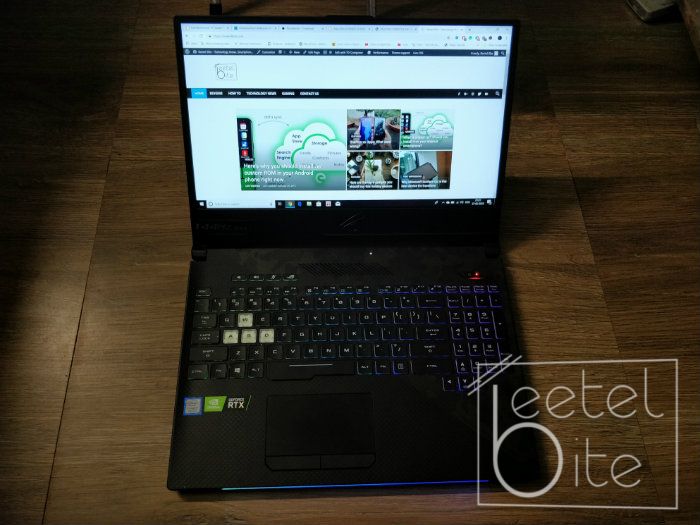
Asus ROG Strix SCAR II comes packed inside of the same body that we got to see on the Strix Hero 2, built out of aluminium and plastic.
Asus has updated one of its older ROG Strix series laptops to feature Nvidia's recently launched RTX series of graphics cards. The new Asus ROG Strix SCAR II gaming laptop except for the RTX series graphics card is similar to the ROG Strix Hero II. This has got us excited, as that was one of the best gaming laptops we have tested at our facility.
Asus ROG Strix SCAR II GL504GV is priced at Rs. 1,64,990.
Here's how the new Asus ROG Strix SCAR II performed during the process of our detailed review:
Asus ROG Strix SCAR II: Design
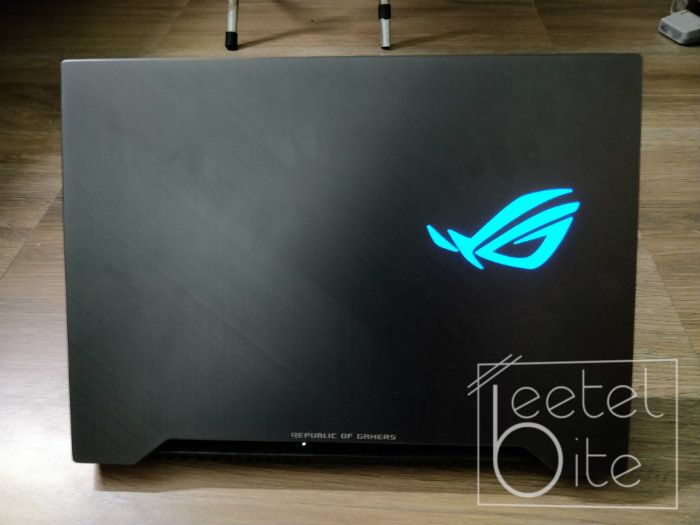
Asus ROG Strix SCAR II comes packed inside of the same body that we got to see on the Strix Hero 2, built out of aluminium and plastic. The device looks stunning and the aluminium and plastic body helps keep the device cooler.
A downside of having a good processing power and a sturdy build is that you will lose out on portability. Though you can carry the laptop around, it isn't extremely portable and has some heft to it. It weighs in at 2.4kg, which might have been ok if left alone. However, the company has paired it with a 230W power adapter that is also quite heavy.
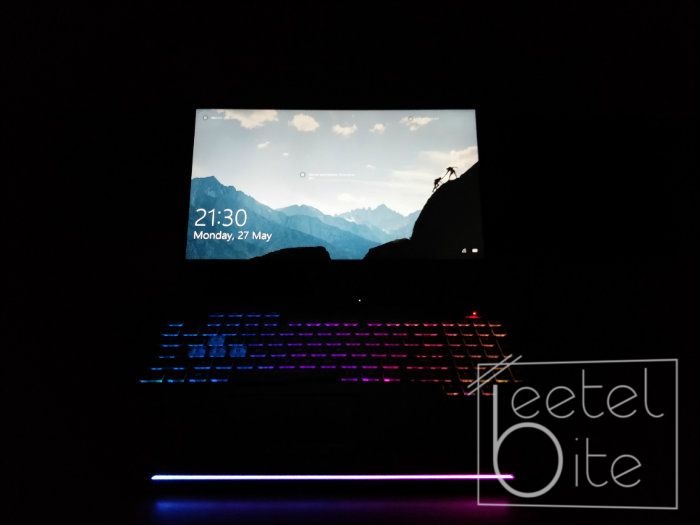
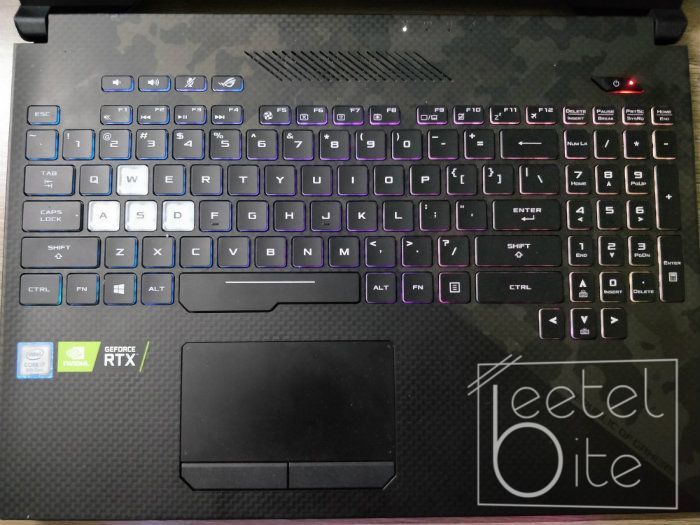
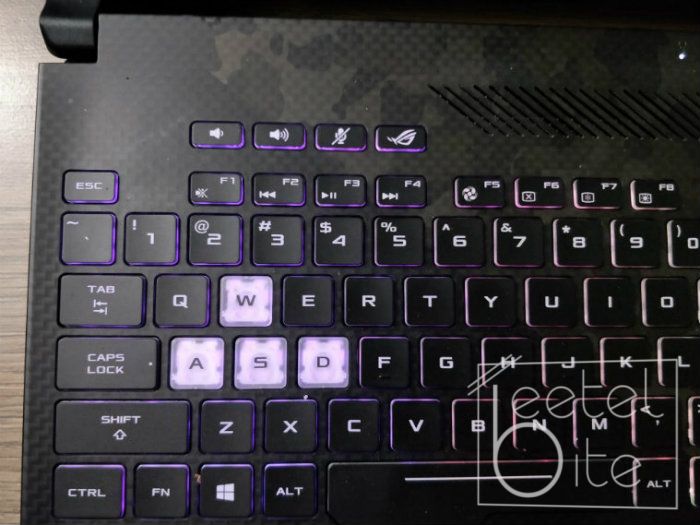
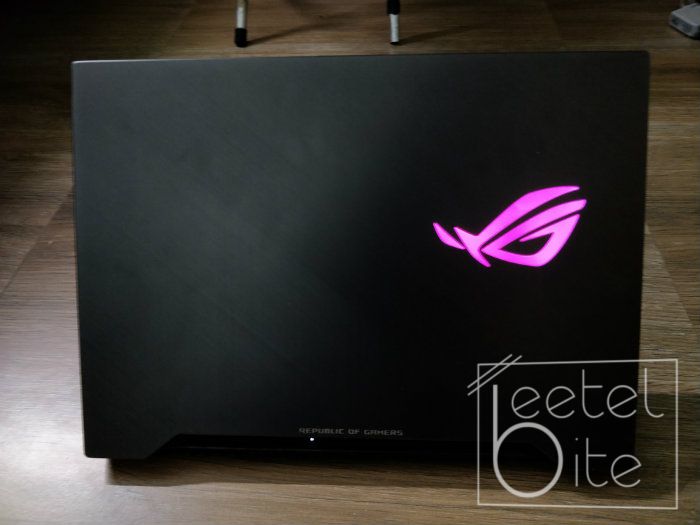
I loved the fact that the laptop has RGB lighting almost everywhere.
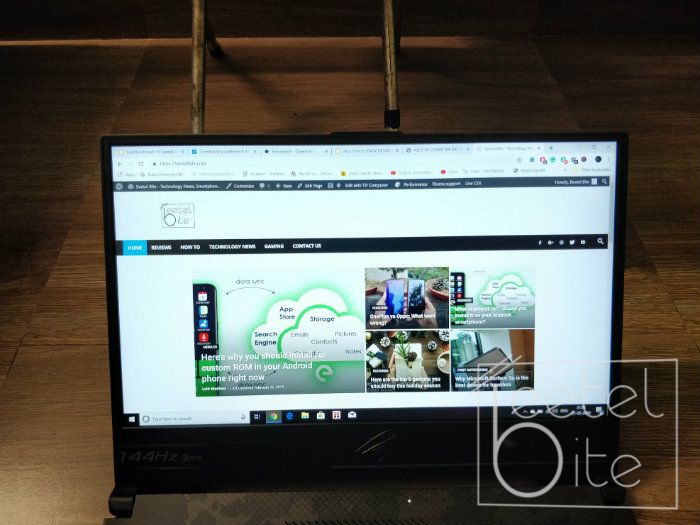
When you open up the flap of the laptop, it reveals a 15.6-inch 144Hz IPS display panel which has very minimal on the sides and the top. But, the chin is relatively huge, this is because the company has worked in its ROG logo along with the webcam there. I would not recommend that you use the webcam on this one as it is not positioned in the best location and will make your face look much bigger than it is.
The ROG Strix SCAR II comes with a charging port, an ethernet port, a mini display port, an HDMI 2.0 port, two USB 3.1 Gen 1 ports, a USB 3.1 Gen 2 Type-C port and a headphone jack on the left edge. Whereas, on the right edge it consists of a USB 3.1 Gen 2 port, an SD card reader and a Kensington lock.
I loved the fact that the laptop has RGB lighting almost everywhere. This might not be a major thing for most people out there. However, for gamers it is. As with that, they can show the world they are different and proud.
Asus ROG Strix SCAR II: Display
The device comes with a 15.6-inch IPS LCD panel with a resolution of 1920×1080 pixels. That might seem like a normal display to most, however, it is not, due to its 144Hz refresh rate and the 3ms response time.
The device comes with a non-reflective display panel, which even made reading and writing on the display much more fun outside.
The display made everything I was doing on the laptop much more appealing. Gaming was the best part, as the games were extremely fluid and there were no choppy graphics or frame drops at all. The games looked much smoother and the character movements felt much more realistic.
Reading and writing were also a blast. The device comes with a non-reflective display panel, which even made reading and writing on the display much more fun outside.
Asus ROG Strix SCAR II: Performance
The variant we got for review purposes came with an 8th generation Intel Core i7-8750H processor, Nvidia GeForce RTX 2060 graphics, 16GB of RAM, 1TB SSHD and a 256GB SSD. The laptop is powerful enough to play, record and live stream heavy games like PUBG, CS:GO, Battlefield V and more simultaneously. To make this possible the company bundles some handy softwares like the XSplit gamecaster and more.
The most interesting game to play on the laptop was Battlefield V, thanks to the game's support for real-time ray tracing. The graphics looked extremely realistic and the game dynamics played very well. The company with the help of the Nvidia GeForce RTX 2060 graphics and a 144Hz refresh rate display has been able to make gameplay much more interesting and realistic.
All the games that I tested out during the review process on the ROG Strix SCAR II, played smoothly with no lags or frame drops. All the games had a constant fps of 100 in the highest graphics settings.
The most interesting game to play on the laptop was Battlefield V, thanks to the game's support for real-time ray tracing.
Now that I have told you everything the laptop has to offer in terms of gaming performance let's get to how good can it handle the heat. The Strix SCAR II comes with two 12V cooling fans, three outlets and an anti-dust system which ejects dust particles through a separate outlet. The company calls this as its HyperCool Pro thermal management system.
Though the HyperCool Pro thermal management system is effective in cooling down the laptop quite a bit. However, in the Turbo mode, it is extremely loud. Considering, most of its vents are placed on the bottom of the laptop, if you have it placed on a bed, cooling it down will take quite some time.
Asus ROG Strix SCAR II: Keyboard and Trackpad
Asus ROG Strix SCAR II's keyboard is extremely comfortable and tactile and as a plus point also looks great. Considering that this is a gaming laptop, the device does have a bit of a weird layout of the keys, which will take a bit of time to get used to.
Asus ROG Strix SCAR II's keyboard is extremely comfortable and tactile and as a plus point also looks great.
The RGB lighting under the keyboard uses a 4-zone LED panel, which can be controlled via the company's own software pre-installed on the device.
The trackpad on the ROG Strix SCAR II is quite smooth and comes with Windows Precision drivers that also makes all the Windows 10 gestures smoother.
I have been using MacBook's for a long time and have loved the trackpad on them the most, due to it being extremely smooth. After using the Mac trackpads I have not liked the trackpads of most other Windows laptops. However, the trackpad on the ROG Strix SCAR II is quite smooth and comes with Windows Precision drivers that also makes all the Windows 10 gestures smoother.
Asus ROG Strix SCAR II: Battery
One of the biggest flaws of having a gaming laptop is that it will be extremely power hungry and you cannot expect much battery life out of it. The device comes with a 64Wh battery, which during the review process gave me approximately three hours of usage on a single charge. This might not be the best in the industry, but then again I wasn't expecting much in terms of battery life from this laptop.
Asus ROG Strix SCAR II: Verdict
Asus ROG Strix SCAR II is an amazing laptop overall. From the day I opened the packaging box, I could not touch my MacBook and am still debating on switching back to Windows. However, this might not be the gaming laptop I personally will switch too.
Last year's Asus ROG Strix Hero II comes with an Nvidia GeForce GTX 1060 at a much lower cost, rest it has no compromises.
Don't take me wrong, this is a great laptop and if you have Rs 1,64,990 in your bank go for it. I love how the laptop was able to deliver all the power I needed at command, ray-tracing games are realistic and fun to play, 144Hz refresh rate makes you fall in love with the fluid display. But the fact I can get all of this except for the ray-tracing graphics card in the same laptop from the same brand at a lower cost is what has kept me from purchasing this.
Last year's Asus ROG Strix Hero II comes with an Nvidia GeForce GTX 1060 at a much lower cost, rest it has no compromises. Considering that I personally would go in for the last year's model. Another reason is that as of now there are only a small number of games that have support for ray-tracing, meaning as of now you wouldn't be able to take full advantage of the Nvidia GeForce RTX 2060 GPU.